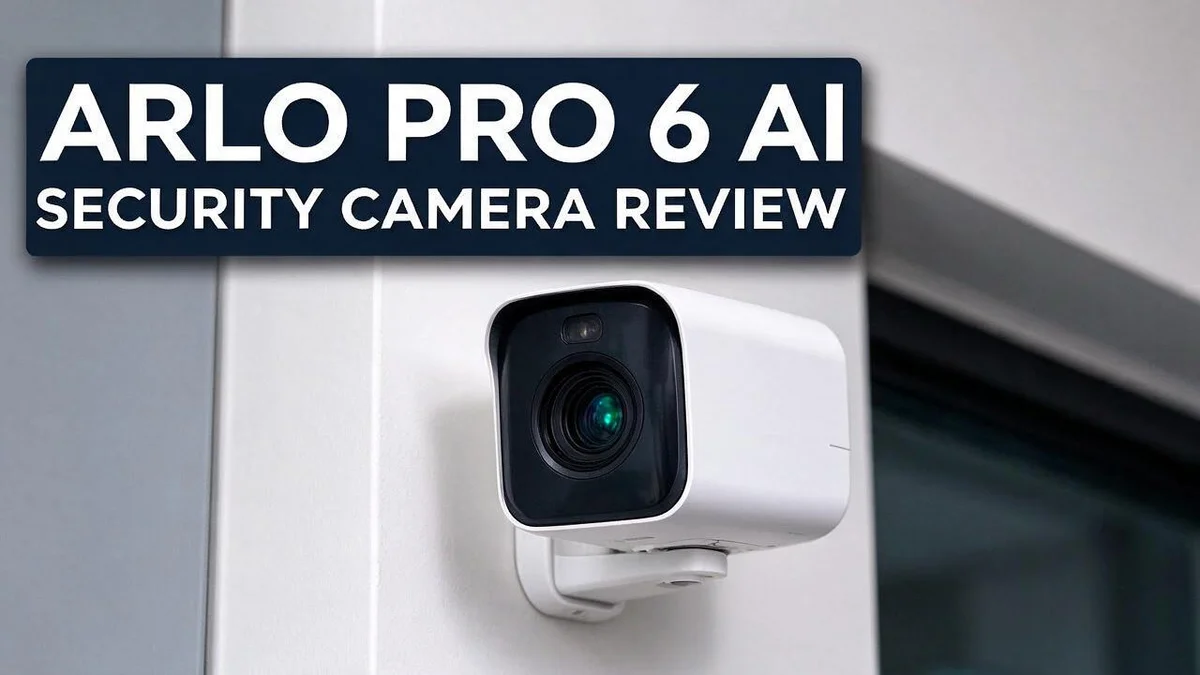
Arlo Pro 6 AI Security Camera Review: Is It Worth It?
Want a security camera that spots people, packages, and vehicles? The Arlo Pro 6 AI security camera aims to do just that. Its setup skips the tangle of cables, so you can place it where you need it most.
Keep an eye on your home from anywhere. This camera records in 2K HDR and shows color at night with its built-in spotlight. A 160° field of view and 12x zoom help you see more of your yard, porch, or driveway.
Smart alerts notify you when motion appears. You can also get 24/7 emergency response and save your clips in 60-day video cloud storage.
Reviewers have noticed this camera. CNET named it a top overall pick, but some owners report pixelation and freezing. Let’s take a closer look to see if it fits your home.
In a Nutshell
- Sharp picture quality: This camera records 2K HDR video for clear detail. Its color night vision keeps scenes easy to see after dark.
- Wide and close views: A 160 degree field of view covers a large area. You can zoom 12 times to check small details without moving the camera.
- Flexible placement: The camera runs on a rechargeable battery, so you can mount it almost anywhere. It works indoors or outdoors, which suits many home layouts.
- Built-in light: A spotlight turns on when the area gets dark. This can help discourage unwanted visitors at night.
- Cloud storage: Your recordings save to the cloud for 60 days. You can review past footage whenever you need it.
- Mixed owner feedback: CNET named it the best all around camera. Some users, however, report pixelation, freezing, and green screen problems, so read recent reviews before you decide.
Key Features and Specifications

- Reliable 2K Protection for Everyday Security: Monitor doors, yards, and entry points with this camera for home...
- Arlo Secure Early Warning System Unlocks Advanced Features: Get 60-day video history, AI detection, and emergency...

Last update on 2026-11-23 / Affiliate links / Images from Amazon Product Advertising API
Let’s look at what sets this model apart from the basics. The camera offers color night vision, so you can see true colors even after dark. Many older cameras only show grainy black and white images at night.
Zoom is another strong point. The camera includes a 12x zoom that lets you read details from far away. You can check a license plate or a delivery label without going outside.
Setup feels simple. The Arlo Pro 6 works without wires, so you skip drilling holes for power cables. You can pair it and start watching in a short time.
The camera works both indoors and outdoors. You can choose the version that fits your space. Mount it near a front door, a garage, or a back patio.
Smart detection goes deeper than basic motion. The AI picks out people, packages, and vehicles. This helps cut down on alerts caused by leaves or swaying branches.
An emergency response option adds another layer. The service runs around the clock, so help can respond when you need it. Check the plan details before you sign up.
Plan ahead for ongoing needs. The camera relies on a subscription to unlock its full feature set. It also has no base station to buy, which keeps the setup simple.
Independent reviews add helpful context. Trusted Reviews rated it 4.5 out of 5, according to Arlo’s marketing page. Security.org also called it a strong performer.
Shoppers often compare this model with Eufy and Yawcam. Yawcam works with a basic webcam, but it lacks the AI and zoom features. Eufy is another brand many buyers consider.
Overall, the feature list covers the essentials well. You get smart detection, night vision, and zoom in one unit. Your best choice depends on which of these features matter most to you.
AI Detection and Smart Alerts
Smart detection changes how you receive alerts. Instead of getting pinged for every shadow, you can focus on what matters.
The AI looks for specific objects. That means a person at your door sends a different signal than a passing car.
This helps you decide how fast to react. A package alert can wait until you check your porch later.
A person alert may need your attention right away. Sorting alerts this way saves time on busy days.
Think about where the camera points. Views of a driveway tend to capture more vehicles. Views of a front door often catch more visitors.
Vehicle detection works well for driveways and quiet streets. It can notice a car pulling in after dark.
Smart alerts also help when you cannot watch the live feed. You still get a clear sign that something happened.
Many people keep notifications on during work hours. Others prefer alerts only when the family is away.
Check your app settings before you rely on alerts. Try different sensitivity levels for a few days. Adjust until the notifications match your daily routine.
Test your setup at different times of day. Lighting changes how the camera reads motion. Morning sun and evening shadows may trigger different results.
Good placement and smart settings work together. Your alerts become more useful over time.
Review recent events in your history after each alert. Scrolling through past clips helps you spot patterns.
You might notice that some alerts repeat at the same hour. Those patterns can point to a busy sidewalk or a noisy neighbor.
Use that information to adjust your settings again. Small changes often make a big difference.
Smart alerts work best when you stay involved. Check your settings every few weeks.
Keep an eye on how often alerts arrive. If the phone buzzes all day, lower the sensitivity a bit.
Installation and Power Options
Setting up this camera is a simple job. You do not need a base station. The camera connects through the Arlo app on your phone.
Download the app before you start. Create your account first. Then follow each step on screen to add your camera.
Test the signal before you mount anything. Stand where you plan to place the camera. Check that the app shows a strong connection.
Power comes from the built-in battery, so you do not need an outlet nearby. That keeps wiring out of the picture.
Charge the battery fully before installation. A full charge gives you a strong start. Keep the charging cable close by for easy top ups.
Build a simple charging routine. Check the battery level in the app each week. Mark a day on your calendar for this task.
Outdoor setups need extra thought. Rain, dust, and cold can affect how the camera performs. Choose a sheltered spot when possible.
Consider how often you will recharge. Cameras that record heavy motion use more power. A busy front porch may need charging more often than a quiet side yard.
Mount the camera at a comfortable height. Aim for a spot where you can reach it easily. Easy access makes charging and cleaning simple.
Some owners like to record a test clip first. Watch the clip on your phone. Adjust the angle if the view feels off.
Keep your phone charged too. The app needs a steady connection to show live views and send alerts.
Installation also affects your daily routine. A camera you can reach easily gets checked more often. Regular checks help you spot problems early.
Top 3 Alternatives
These three cameras make strong alternatives for home monitoring. Each one offers clear video and easy setup.
Ring Stick Up Cam

- Outdoor Cam (Stick Up Cam) Battery is a battery-powered camera that’s built for outside, but ready for anywhere.
- Live View and Two-Way Talk - See, hear, and speak to people on camera and can check in on your home any time...
Last update on 2026-11-23 / Affiliate links / Images from Amazon Product Advertising API
The Ring Stick Up Cam works well both indoors and outdoors. It records sharp video day and night. Motion alerts reach your phone quickly, so you always know what happens at home. Setup takes only a few minutes with the app. This camera suits people who want simple, dependable monitoring.
Eufy SoloCam S340

Last update on 2026-11-23 / Affiliate links / Images from Amazon Product Advertising API
The Eufy SoloCam S340 runs on solar power, so charging is rarely a problem. It sits outside and keeps watch all day. The camera offers colorful video and smart person detection. This model fits anyone who wants long battery life and fewer trips outdoors.
Wyze Cam v4

- SMART 2.5K QHD RESOLUTION — CAPTURE EVERY DETAIL — Record in crystal-clear 2560×1440 video with a 120° wide...
- ENHANCED COLOR NIGHT VISION — SEE CLEARLY IN TOTAL DARKNESS — Industry-leading Starlight Sensor paired with a...
Last update on 2026-11-23 / Affiliate links / Images from Amazon Product Advertising API
The Wyze Cam v4 is a compact camera that performs well indoors. It records in full color, even in low light. You can view live video and talk through two way audio. Motion and sound alerts help you stay informed. This option works best for renters and first time camera owners.
Each camera offers a different mix of features. Think about where you want to place it and how you want to receive alerts. Then choose the one that fits your home best.
Cloud Storage and Subscription Value
Cloud storage keeps your recordings safe off the camera. The Arlo Pro 6 includes 60 days of video cloud storage. Your clips stay available even if someone removes the camera.
The Arlo Pro 6 works with a subscription and no base station. The cloud handles the saving job for you. This setup keeps the hardware simple.
Think about how long you need to look back. Sixty days gives you a useful window for most homes. If you need older clips, save them before the window closes.
Count the cameras you plan to run. A busy front door and driveway create far more clips than a quiet back porch.
Cloud storage also helps you review events from your phone. You can open saved clips from anywhere with an internet connection. This makes it easy to check on your home during a trip.
One owner claimed the company stopped investing in this model. Check the current lineup before you decide. Read the storage details carefully before you rely on them.
Save key clips to your phone as an extra copy. This gives you a backup you control, even if your plan changes.
Check your privacy settings too. Cloud footage can show private moments from your home. Make sure only people you trust can see your account.
Mark your renewal date on a calendar. This helps you avoid gaps in cloud access. Gaps can mean missing clips from key moments.
Run a quick test after setup. Walk in front of the camera and confirm the clip appears in your history. Test again after you move the camera.
If the camera goes offline, your saved clips stay in the cloud. That gives you a second layer of safety. Think of it as a safety net for your home.
Your footage stays searchable and ready when you need it. Check for any changes to storage each year and adjust as needed.
Reliability and Long-Term Support
Reliability matters as much as features. A camera must work on the day you need it. This section explains how to keep your Arlo Pro 6 running well for years.
Some owners report video problems. One Reddit user described pixelation, freezing, and a green screen tint. Watch for these issues during your first few weeks.
Video glitches often start with your network. Weak internet signal can cause freezing and blurry clips. Keep the camera within strong signal range of your router.
Keep firmware up to date. Updates fix bugs and improve stability. Turn on automatic updates in the app, or check for them each month.
Track problems in a simple log. Write down the date, time, and what you saw. Patterns make support calls much faster.
Review your event history for gaps. Missing clips can signal connection drops. Compare the timestamps with your internet outage times.
Check the camera body after storms. Look for loose mounts, cracked lenses, or water near the seal. Clean the lens monthly so the image stays sharp.
Test the siren and spotlight every few months. Confirm they respond in the app. This keeps your deterrents ready when you need them.
Contact Arlo support early. Describe the glitch and share your log. Ask whether a replacement or repair is available under warranty.
Plan for the future of your device. Companies can change support plans over time. Read the warranty terms and note how long the product gets official care.
Build a backup plan. Keep a second camera or a simple webcam option ready. This way, your home stays covered during repairs.
Check your return window before you finish setup. Test every feature during that time. Good records make warranty claims easier.
Reliable performance comes from smart habits. Watch your footage, update regularly, and keep notes. Your camera will serve you better over time.
Pros and Cons
Pros
-
- CNET named it the best all-around option.
-
- Person, package, and vehicle detection helps you skip false alerts.
-
- 24/7 emergency response adds extra peace of mind.
-
- Color night vision keeps the scene clear after dark.
-
- Trusted Reviews gave it a strong 4.5 out of 5 rating.
Cons
-
- Some owners report pixelation, freezing, and green screens.
-
- Reviews from different sites do not always agree on quality.
-
- Other Arlo models in the current lineup may fit some homes better.
-
- Free webcam software like Yawcam AI can handle basic monitoring.
Who Should Buy It
Renters and first time owners often find this camera a good fit. It travels well when you move. People who may not stay in one place for long will appreciate that flexibility.
Families with teens or busy schedules can also benefit. Alerts show who arrives home. A parent can check the front door from work without making a call.
Pet owners make another good match. You can check on a dog or cat during the workday. A camera aimed at the living room lets you look in at any moment.
Small shop owners can use it as well. A back room or checkout counter often needs eyes when staff step away. The spotlight can also make a dark entrance feel safer for customers.
Think about where you spend most of your time at home. A front porch, side gate, or driveway often shows the most daily activity. Choose the spot that fits your routine.
Night shift workers can keep an eye on the house while they sleep during the day. Person alerts help them tell a visitor from a passing animal. That saves time and reduces stress.
Strong internet near the door matters most. A steady signal supports smooth video. If your router sits far away, test the spot before you mount the camera.
Before you buy, list your top three concerns. Maybe you worry about package theft, late night visitors, or kids coming home alone. Matching the camera to those concerns makes the choice easier.
Who gets the most from it? Someone who wants a simple setup and clear alerts. Someone who checks a phone often will find the mobile view handy. Someone who wants a clear view of the entryway will feel right at home.
Who should look elsewhere? People who want all footage kept only on their own hardware may feel uneasy. Those who dislike ongoing plans may prefer another option. Free software or a different model may suit them better.
Final Verdict
The Arlo Pro 6 can be a strong choice for many homes. It pairs sharp video with smart alerts. The right choice still depends on your daily needs.
Start by thinking about your home layout. Does the camera need to watch a front door, a driveway, or a backyard? A clear view matters more than any spec sheet.
Look at your routine too. If you leave home often, real-time alerts matter most. If you work from home, you may want fewer notifications. Adjust motion zones early so the camera stays useful.
Plan a short test before you rely on it. Watch how many alerts you receive each day. Adjust sensitivity until the feed feels calm and useful.
Check your internet signal at the mounting spot. A weak connection can ruin even the best camera. Stand near the spot and test the live view on your phone.
Pay attention to the app, too. Quick access to live view matters when someone rings the bell. A clean layout saves time and reduces stress during busy moments.
Consider shared access as well. Family members may need their own logins. Set roles early so everyone knows who manages settings and alerts.
Keep your expectations realistic. No camera covers every angle, and no cloud plan fits every household perfectly. Pair this camera with smart placement and regular checks for the best results.
Remember that your setup can change over time. Move the camera if you spot blind spots. Small adjustments often bring big improvements.
Finally, decide what success looks like for you. Maybe success means fewer missed packages. Maybe it means peace of mind on late nights. Write that goal down before you buy.
In short, this camera suits people who want a simple, capable setup. It fits homes that need clear night footage and quick alerts. Compare a few options, then choose the one that fits your space best.
Frequently Asked Questions
Can I use this camera indoors and outdoors?
Yes, Arlo sells this camera for both indoor and outdoor use. Its rechargeable battery lets you place it almost anywhere. Mount it near the door or window you want to watch. Outdoor spots often get more movement, so plan your angle carefully.
Do I need a base station?
No, you do not need a base station. The camera connects straight to your home network through the Arlo app. Setup stays simple for most people, so beginners can manage it on their own.
How long does Arlo keep my video?
Arlo stores your video in the cloud for 60 days. You can scroll back through past clips in the app. Save any important footage before the window ends. Your plan details show exactly what you get.
Does the spotlight help at night?
Yes, the camera includes a spotlight. It lights up the area when it senses movement. Bright light helps the camera capture clear color footage after dark. Use it to discourage visitors who should not be near your property.
Will Arlo keep supporting this model?
One owner claimed Arlo stopped investing in this model. The research did not confirm that claim. Check recent update news before you decide. Your support history can help you plan for the long term.

Hi, I’m Simmy — the founder and voice behind AI Gadgets Insight. I’m a tech enthusiast who loves exploring the latest AI gadgets, smart devices, and innovative tech products. I started this blog to help people make smarter tech choices with honest reviews, easy-to-follow comparisons, and practical buying guides.