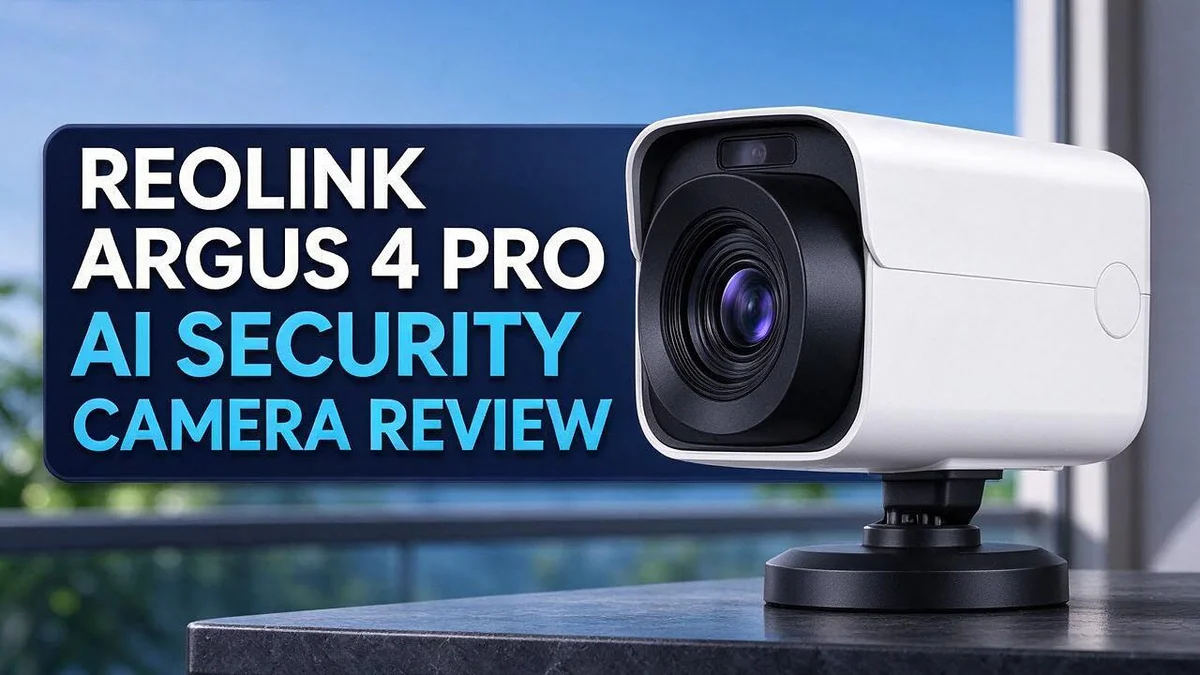
Reolink Argus 4 Pro Review: Is It Worth The Price?
Tired of blind spots around your home? Most outdoor cameras leave gaps you never see. The Reolink Argus 4 Pro aims to close them.
Picture one camera that watches your driveway and backyard at the same time. It uses dual lenses to create a wide 180 degree view. You also get sharp 4K video, even in the dark.
The camera runs on battery power with a 6W solar panel in the box. That means fewer cables and less climbing up ladders. It also spots people, vehicles, and animals with AI detection.
Color night vision keeps your yard clear after sunset. Local microSD storage up to 512GB keeps footage close to home. Smart home fans can link it with Google Home or Alexa.
In this review, we test what works well and where the camera falls short. Let’s see if it earns a spot on your property.
In a Nutshell
- Smart alerts cut the noise. The camera detects people, vehicles, and animals. You see what matters first, so you spend less time scrolling through empty clips.
- Local storage keeps footage close. A microSD card can hold up to 512GB of video. You can keep clips on site without relying on cloud storage.
- Setup feels simple. Bluetooth helps you connect the camera during setup. The app then guides you through network sign in and basic settings, so beginners can finish fast.
- Smart home friends welcome it. The camera works with Google Home and Alexa. You can check live views on a speaker or display, which makes daily use feel easy.
- Motion detection feels quicker. It reacts faster than earlier battery models did. Fast alerts help you check the yard before a visitor leaves.
- Some users report hiccups. Reports mention connection issues and problems when the camera wakes up to record. Test the camera for a few days before you rely on it for security.
Video Quality and 180° Coverage

- Magnetic Mount with Adjustable Viewing Angle: Attach to metal surfaces or secure with screws for stability. This...
- AI Person Detection & Two-Way Talk: Smart AI detects people to reduce false alerts from shadows or vehicles...

Last update on 2026-11-05 / Affiliate links / Images from Amazon Product Advertising API
Sharp video matters most when you need answers. This camera records in 4K ultra high definition, so small details stay visible. A package near the edge of the porch looks clear, not blurry.
Wide views bring one common challenge. Objects far from the lens can look smaller. The 4K sensor helps, because it keeps more pixels for those distant spots.
Placement changes everything. Mount the camera high on a wall or eave. A higher angle lets the view cover more ground without losing focus. Aim it so the main path sits near the center of the frame.
Think about what you want to see. A driveway needs a view of the car and the walkway. A backyard needs a view of the fence line and the gate. Plan the angle around those spots first.
Night footage tells a different story. Color night vision works well when a light source sits nearby. Dark corners far from the lighting still show less detail, so test the camera after dark.
Daytime footage looks its best in soft light. Bright sun can create harsh shadows across the frame. Shade the lens or pick a spot away from glare if needed.
Stitched views need a close check. Where two lens images meet, edges can look slightly different. Watch the middle of the frame during your first few days of use.
Your network plays a big role too. A strong signal keeps live streams smooth and sharp. Weak signal can cause blurry or choppy live views, so place the camera within easy reach of your router.
Check your settings in the app. Choosing the highest video quality gives the sharpest results. It also uses more storage, so balance clarity with space.
Quick tip: Review a full day of footage. This shows how light shifts across the frame. You can then adjust the angle with confidence.
Final verdict on clarity: The image holds up well for most homes. Small flaws appear mainly at the edges and in dark corners. Smart placement solves most of them.
AI Detection and Color Night Vision
Smart detection helps you focus on what matters. Many cameras send alerts for every shadow or swaying branch. This model sorts motion into clearer groups. You spend less time scrolling and more time acting.
Fewer false alarms keep you alert. Constant pings can make you ignore your phone. Missing a real visitor is the bigger risk. A camera that sorts events well keeps you aware without the stress.
Person, vehicle, and animal detection work together. The system checks the shape and movement of each object. This helps you tell a delivery van from a raccoon at a glance.
Color night vision changes how you read footage. Black and white clips can make faces hard to identify. Color footage shows clothing, car colors, and bags. That detail helps when you review an event later.
Lighting plays a key role in clarity. Bright spots near the camera can wash out details. Dim corners on the far side of a yard may look blurry. Test the view at dusk and after dark before you trust it fully.
Event labels speed up clip reviews. The event list shows who or what triggered each clip. You can skip routine motion and watch only the events you care about. This saves time on busy days.
Everyday use brings a learning curve. Detection works best on clear paths and open lawns. Busy scenes with many moving objects may need more tuning. Give the system a week to settle before you judge it.
Simple tweaks improve results. Start with the default settings in the app. Adjust sensitivity if alerts feel too frequent. Move the camera if trees or passing traffic trigger motion again and again.
Our take on the night view. The color image looks helpful for most backyards and driveways. Some scenes still need extra light for sharp faces. Overall, the night mode earns solid marks for everyday security.
Solar Power and Battery Performance
The Reolink Argus 4 Pro includes a 6W solar panel in the box. This lets you keep the camera charged without running cables. Solar power makes it a strong pick for spots far from an outlet.
Sunlight is the key to this setup. The panel needs direct light to top up the battery. Shade from trees or nearby roof lines can slow charging a lot.
Before you mount anything, watch where the sun moves across your yard during the day.
Panel direction matters too. Point the panel toward the sun for the best results. Many people aim it south in the Northern Hemisphere, but your yard may get light from other angles. Check the sun path for a few days before you lock the bracket in place.
Cloudy weeks test any solar camera. Gray skies mean less energy goes into the battery. The camera still runs on stored power during dark or overcast days. A full charge helps it last through short gaps in sunlight.
Winter brings its own challenge. Shorter days mean less sun hits the panel each day. Cold temperatures can also drain batteries faster. Plan for extra charging time if you live in a region with harsh winters.
Recording habits affect battery life. Continuous recording uses more power than motion triggered clips. Lower the frame rate or shorten clip length in the app if you want longer runtime.
Check the battery level often. The app shows the charge status, so you can spot trends early. A slow drop over several days may signal shade or a dirty panel. Wipe the panel gently with a soft cloth every few weeks. Dust and bird droppings block light and cut charging power.
Solar power saves time on installation. You skip the hunt for an outdoor outlet. You also avoid long extension cords that can get damaged by weather.
Still, the panel does not replace careful planning. Plan your mounting height and angle before drilling holes. A little effort keeps the camera running all year.
Top 3 Alternatives
Wyze Cam v3

- Color night vision: An all-new Starlight Sensor records night time video in full, vivid color. The Starlight Sensor...
- Indoor/Outdoor: Wyze Cam v3 is a wired video camera with an IP65 rating so you can confidently install it outside...
Last update on 2026-11-05 / Affiliate links / Images from Amazon Product Advertising API
The Wyze Cam v3 suits families who want good video on a small budget. Its built-in spotlight lets it record full color footage at night. It also works well indoors, such as in a nursery or garage.
You can watch live video from your phone at any time. Person detection cuts down on alerts from passing cars. Setup takes only a few minutes, and no extra hub is needed.
Eufy SoloCam E40

- MaxColor Night Vision with 2K QHD: Delivers vivid, full-color surveillance footage even in near-total darkness with...
- Solar-Powered, Worry-Free Security: Built-in solar panel paired with a 13,000 mAh battery keeps each camera running...
Last update on 2026-11-05 / Affiliate links / Images from Amazon Product Advertising API
The Eufy SoloCam E40 runs on a rechargeable battery, so you can mount it almost anywhere. A solar panel accessory can keep the battery charged over time. The battery can last several weeks between charges, depending on use.
It records sharp 2K video and follows movement with smart tracking. You can also store clips locally. This keeps your footage off the cloud if privacy matters to you.
Blink Outdoor 4

- Outdoor 4 is our most affordable wireless smart security camera yet, offering up to two-year battery life for...
- See and speak from the Blink app — Experience 1080p HD live view, infrared night vision, and crisp two-way audio.
Last update on 2026-11-05 / Affiliate links / Images from Amazon Product Advertising API
The Blink Outdoor 4 suits people who want simple, dependable monitoring. Its batteries can last up to two years, so maintenance stays low. Many owners find it easy to set up in under an hour.
The camera connects through a small hub for a stable link. Motion alerts arrive quickly, and you can review clips right in the Blink app.
Setup, App Experience and Smart Home Integration
Setting up the Reolink Argus 4 Pro feels straightforward. The built in Bluetooth module helps your phone find the camera fast. You can finish the first connection in just a few minutes. Keep your phone close during this step.
Before you begin, write down your wireless network name and password. The Reolink app guides you through each stage. Create an account, then add the camera by scanning the code on the device. Each screen shows a short instruction, so you rarely feel lost. Take your time and read each prompt.
Test the live view before you climb a ladder. Some owners report connection issues, so check the picture while the camera sits on a table. A quick test saves you from a second trip.
Renaming each camera makes the app easier to read. Names like Front Door or Back Gate tell you where each feed comes from. This habit matters more once you add a second or third device.
Linking the camera to your voice assistant takes only a few taps. The model works with Google Home and Alexa. Once linked, you can ask for a live view on a compatible smart display.
Smart home routines open more options. You can pair camera alerts with other devices, such as a hallway light. Test each routine once so you know it runs as expected. Many people start with motion alerts and then add more routines over time.
Local storage keeps your footage at home. A microSD card up to 512GB holds the recordings. Format the card in the app before you rely on it, so the system saves clips correctly.
The app also shows firmware update prompts. Install updates when they appear, since they can improve stability and compatibility with your smart home gear. Keep the phone app updated too.
Pros and Cons
Pros
- The wide view covers driveways and backyards with one unit.
- You do not need a monthly fee to start using it.
- Motion alerts arrive faster than earlier battery models.
- Wireless reception stays strong across the property.
Cons
- Some recordings start late after the camera wakes up.
- The first seconds of a fast event can go missing.
- Each new spot may need a few test runs before it works well.
Who Should Buy It
This camera suits homeowners who want outdoor coverage without running cables. The Reolink Argus 4 Pro works well for anyone who wants a battery powered outdoor camera that mounts almost anywhere.
Renters often fit this group well. A wireless camera lets you watch the front door without drilling holes in walls. You can also take it with you when you move.
Owners of hobby farms and long properties can place it far from the house. Sheds, gates, and fence lines are easier to watch when power outlets are not nearby.
Pet owners and parents may enjoy the animal and person alerts. Keeping an eye on the back gate while kids play outside brings real peace of mind.
Small business owners also see a fit. A camera can watch a storage shed, a parking lot, or a job site after hours.
Vacation home owners gain another reason to consider it. You can check the property between visits and see who arrives while you are away.
Buyers who need a camera that never misses a moment should think twice. Wired models with constant power may suit that goal better. Battery models depend on charge levels and daylight, so you should plan a backup option.
Shoppers with heavily shaded lots should also pause. Thick tree cover can slow solar top ups, so check your sun exposure first.
Before you decide, list your top three camera spots. Then ask whether each spot gets steady sun and clear access for setup. This quick check helps you match the camera to your real needs.
In short, choose this camera if you want flexible placement and a clear view of large outdoor areas. Skip it if you need guaranteed recording at every single second.
Final Verdict
So, is the Reolink Argus 4 Pro worth a spot on your shortlist? For most outdoor spaces, the answer is yes. It delivers clear 4K video and useful alerts without any wires.
This camera fits people who want strong outdoor protection with less work. It covers large areas with one unit. It also frees you from drilling holes for power cables.
The main question is how much you can trust every clip. Reported connection issues and recording delays after wake-up deserve a close look. Keep that in mind before you buy.
Your daily habits matter here. If you check footage often, the alerts will help you stay informed. If you need a perfect record of every second, a wired model may serve you better.
Shopping around is smart too. Tapo, Arlo, Unifi, Lorex, and Amcrest each bring different strengths to the table. Read recent owner reviews for each one, and compare how they handle your specific space.
Think about your mounting plan as well. Height, angle, and sun exposure shape how well the camera sees. Weather plays a role too. Rain, snow, and heavy wind can affect image quality over time, so clean the lens often.
Overall, this camera earns a solid spot on your list. It works best for homeowners, renters, and property owners who value wide views and wireless freedom. It asks for patience during setup, though, and that effort pays off once the camera settles in.
Take your time before you decide. Watch a few days of footage from your chosen spot. That simple step tells you more than any spec sheet can.
Frequently Asked Questions
Does the Reolink Argus 4 Pro record in color at night?
Yes, it does. The color night vision helps you spot clothing, vehicles, and faces after dark. Your clips stay useful even when the lights are off.
Can it tell people, pets, and cars apart?
Yes. The AI detection sorts alerts into person, vehicle, and animal groups. You can turn off the types you do not need, so your phone only buzzes for events that matter.
Does Bluetooth make setup easier?
Yes. The Bluetooth module helps you link the camera to your phone during the first setup. You can then finish the rest of the process in the app.
How should I aim the solar panel?
Point the panel toward the spot that gets the most sun each day. Wipe off dust and leaves now and then. Clean panels keep the battery charging more steadily.
What video quality can I expect?
The camera records in 4K UHD, so small details stay sharp. You can zoom into a clip to review faces, clothing, and vehicle details. This helps when you need to check what happened.
How does it compare with other popular brands?
Shoppers often compare it with the Tapo SolarCam C402 Kit, Arlo, and Unifi G4 Instant. Look at coverage, app ease, and alert speed side by side. That gives you a clear view of the best fit for your property.

Hi, I’m Simmy — the founder and voice behind AI Gadgets Insight. I’m a tech enthusiast who loves exploring the latest AI gadgets, smart devices, and innovative tech products. I started this blog to help people make smarter tech choices with honest reviews, easy-to-follow comparisons, and practical buying guides.