Ring Wired Doorbell 4K Pro Review: Is This AI Video Doorbell Worth It?
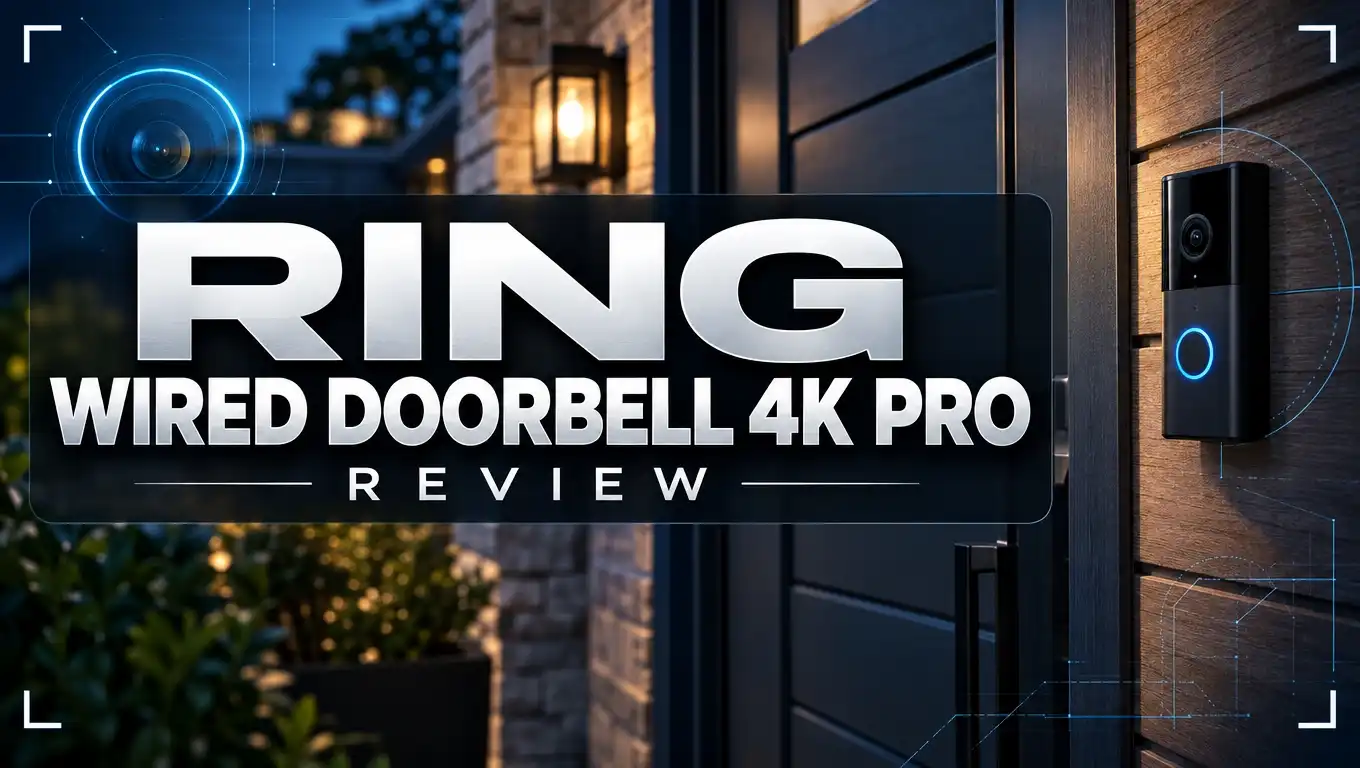
Your front door is the first thing visitors see. Knowing who is there matters. The Ring Wired Doorbell 4K Pro helps you stay connected at home.
This AI video doorbell records sharp 4K video. It also offers Night Vision and up to 10x Enhanced Zoom. A wide 140° field of view shows more of your porch than older Ring models.
Motion detection is sensitive and customizable. You can set motion zones, so you get alerts that matter.
The camera also saves six seconds of video before motion starts. Plus, AI video descriptions and Alexa support make daily use simple.
Is it the right fit for your home? This guide covers the key features, the pros and cons, and how it compares to other video doorbells.
In a Nutshell
-
Best for wired homes: This model suits homes that already have doorbell wiring. It draws steady power, so you never need to recharge batteries. Installation stays simple when the wires are already in place.
-
Smart AI descriptions: The camera writes short AI video descriptions for each event. You can read what happened before you open the full clip. This saves time on busy days.
-
Voice assistant support: Alexa users can check the feed with simple voice commands. IFTTT also links the doorbell to other smart home devices, so routines can run automatically.
-
Wider view of the porch: The square video frame captures more space near your door. Packages, pets, and visitors stay in view from the doorstep to the walkway.
-
Storage tradeoff to know: Videos do not save to local storage on the device. You need online storage to review past clips, so plan for that from the start.
-
Other options to compare: The Blink Video Doorbell adds Alexa support in a simpler package. The Ring Battery Doorbell Plus suits buyers who want to skip wiring entirely.
Video Quality and Night Vision

- Capture it all with Retinal 4K video — See your home or business in the ultimate clarity with Retinal 4K.
- Zoom in up to 10x — Catch details at a distance with up to 10x Enhanced Zoom.

Last update on 2026-11-05 / Affiliate links / Images from Amazon Product Advertising API
Video quality is where this doorbell truly shines. Clear pictures help you spot faces, packages, and pets at a glance.
The 4K resolution leaves room to zoom in without losing much detail. Enhanced Zoom reaches up to 10x, so you can check a package label or a visitor’s face from your phone.
Zoom works best when the light is good. Use it for quick checks, then return to the full frame for context.
Night vision keeps your porch visible after sunset. Many doorbell cameras struggle in darkness, so this feature matters.
Night footage often appears in black and white. This style keeps shapes, movement, and outlines easy to read.
Glare can be a problem at night. Bright lights or shiny surfaces near the door may wash out parts of the picture.
A porch light helps the camera capture faces and small details. Adding a warm lamp nearby can improve results without extra gear.
Test the view after you install it. Check the feed at dusk and again after dark.
Dust, rain spots, and cobwebs can blur the lens over time. Wipe the lens every few weeks to keep images sharp.
A clear frame gives your phone a better preview before you open the app. Sharp pictures also make it easier to recognize familiar faces at a glance.
Daytime footage looks different from night footage. Bright sun can create harsh shadows across the porch. Try to angle the camera so the door stays evenly lit.
Good placement makes a big difference. Mount the doorbell at a height that shows faces clearly without tilting too far down.
Clear video also helps with nighttime reviews. You can scroll through recent events and spot details without straining your eyes.
Overall, the video quality feels dependable for everyday use. Most homeowners will notice clearer evening footage than older doorbells gave them.
Motion Detection and Alert Accuracy
Good alert accuracy starts with the right setup. Spend a few minutes in the app before you rely on the alerts. Most false alarms come from settings that were never adjusted.
Draw motion zones with care. Focus the zones on the doorstep, the walkway, and the porch steps. Leave out the street, passing cars, and nearby bushes. This simple change stops many alerts that have nothing to do with your visitors.
Sensitivity is the next setting to check. Higher sensitivity catches small movements, but it also picks up shadows, headlights, and drifting leaves. Lower it a little, then watch the event log for a few days.
Mounting height and angle matter too. Aim the camera down the porch instead of toward the road. A clean lens also helps. Wipe away dust, cobwebs, and rain spots so the software gets a clear view.
Weather can trigger alerts. Wind moves plants, flags, and hanging decorations. Rain can create odd shapes on the lens. After a windy day, check your alert history to see which events were false. Then adjust the zones to avoid those areas.
Lighting changes can also confuse the system. Sudden shifts from sunlight to shadow may cause extra alerts. A porch light on a timer keeps the scene steady at dusk. It also helps the camera spot visitors who arrive after dark.
Notification settings shape your daily experience. You can choose which events send a phone alert. Many people turn off alerts for regular activity they already expect, such as a daily delivery. This keeps your phone calm while still recording the moments that matter.
Test the system yourself. Walk through the motion zones and note how quickly the alert arrives. Ask a family member to stand at the door. Compare what you see in the event list with what really happened. This quick test shows you where the settings need work.
Finally, keep the app and device updated. Firmware updates can improve detection over time. Review your settings every few months, especially when seasons change. Small tweaks often lead to much better accuracy.
Installation and Power Requirements
Installing this doorbell takes some planning, but most people finish in an afternoon. Start by turning off the power at your breaker box. Safety always comes first.
Check your wiring before you start. Look at the wires behind your current doorbell. Note how many wires connect and whether they look healthy.
Confirm the transformer rating. Find the transformer near your furnace or electrical panel. Compare its voltage label with the range listed in the Ring manual.
Your chime needs attention too. Some older mechanical chimes can buzz or cut out. A compatible chime kit often fixes this problem quickly.
Mounting height affects video quality. Most installers place the camera about four feet above the ground. That height gives a clear view of faces and packages.
Angle matters as well. Tilt the camera slightly down so it captures the doorstep. Avoid aiming it straight into the sun or a bright porch light.
Test your wireless signal first. Stand where the doorbell will sit and check your phone’s connection. A weak signal can cause lag in live view and delayed alerts.
Plan for power outages, too. Since this model is hardwired, it stops working when the house loses power. Some homeowners add a backup power source to keep the feed running during an outage.
Power needs a quick check after setup. Open the Ring app and confirm the device shows a steady power status. Power loss means missed events and no recordings.
Gather the right tools. A screwdriver, wire stripper, drill, and level will help. Keep the packaging nearby for the included mounting screws and anchors.
Save your installation photos as well. They help you remember wire colors and mounting positions if you need to troubleshoot later. A quick photo takes seconds and saves time.
Call a licensed electrician if anything feels unclear. Damaged wires, a missing transformer, or an old wiring setup need a professional. Your safety matters more than a quick finish.
Top 3 Alternatives
Google Nest Doorbell

- Meet the wired Nest Doorbell; with 2K HDR video and Gemini, it knows what’s at your door and and what to do next...
- No need to recharge or replace batteries; the Nest Doorbell keeps you plugged into home, day and night
Last update on 2026-11-05 / Affiliate links / Images from Amazon Product Advertising API
This doorbell suits people who already use Google Home. It sends smart alerts when it spots a person, package, or animal. The video is clear, even in busy outdoor spaces.
You can talk to visitors right from your phone. Event history also helps you review who came by and when.
Arlo Essential Wired Doorbell

- Video Doorbell Camera for Complete Front Door and Entryway Protection: Monitor your front door with 2K video...
- Arlo Secure Early Warning System Unlocks Advanced Features: Get 60-day video history, AI detection, and emergency...
Last update on 2026-11-05 / Affiliate links / Images from Amazon Product Advertising API
This option keeps things simple and easy to set up. It records sharp HD video with a wide view of your porch. Motion alerts let you know when someone steps into the frame.
Two-way audio lets you chat with guests or delivery drivers. It is a friendly pick for anyone who wants reliable basics.
eufy Video Doorbell E340

- 𝐃𝐮𝐚𝐥 𝐂𝐚𝐦𝐞𝐫𝐚𝐬, 𝐃𝐨𝐮𝐛𝐥𝐞 𝐒𝐞𝐜𝐮𝐫𝐢𝐭𝐲 | Dual...
- 𝐋𝐨𝐜𝐚𝐥 𝐒𝐭𝐨𝐫𝐚𝐠𝐞,𝐍𝐨 𝐒𝐮𝐛𝐬𝐜𝐫𝐢𝐩𝐭𝐢𝐨𝐧 | 8GB...
Last update on 2026-11-05 / Affiliate links / Images from Amazon Product Advertising API
This model stands out with its dual lens design. It gives you a wide view from head to toe. The camera also captures detail near the door.
Color night vision keeps your entryway easy to see after dark. You can also choose local storage, so your footage stays close to home.
Privacy and Video Storage
Your doorbell records more than you might expect. It captures visitors, delivery drivers, and people walking past on the sidewalk. Smart privacy habits protect your household and your neighbors.
Start with account security. Turn on two step verification in your app. This adds a second check when someone signs in. A strong, unique password also helps keep strangers out.
Next, review who can access your videos. Shared users can view live feeds and past recordings. Remove anyone who no longer needs access, such as a former tenant or an old roommate.
Think about the camera angle. Point the lens at your own property. Avoid aiming it straight into a neighbor’s window or yard. This keeps your setup friendly and legal in most areas.
Check audio settings too. The doorbell can record sound along with video. Some regions have strict rules about recording voices. Look up local laws before you turn on audio features.
Know your local rules. Some cities require signs that say cameras are in use. Check local requirements before you install the doorbell.
Your videos go to the cloud when you use a storage plan. Cloud storage means Ring servers hold your clips. Read the privacy policy so you know how long files stay online.
Know how police requests work. Ring may share footage with law enforcement only when it has legal grounds or you agree. Review your app settings so you understand the process.
Delete clips you do not need. Regular cleanup limits how much personal footage sits in your account. You can remove single events or clear older recordings in the app.
Limit sharing with others. Think twice before you post a clip on social media. Faces and house details can reveal more than you intend. Share only what you truly need to share.
Finally, keep your app and camera firmware updated. Updates often fix security gaps. Set a reminder each month so you never miss an important patch.
Smart Home Integration and AI Features
Smart home integration turns this doorbell into a helpful hub for your daily routines. It connects with voice assistants and other tools you already use.
Voice control with Alexa brings the doorbell into your living room. You can ask Alexa to show your front door on a compatible Echo Show. Simple voice commands help you check the porch without reaching for your phone.
IFTTT opens up custom routines. IFTTT connects the doorbell with other apps and devices. You can set a rule that sends a message when someone presses the button. Many people enjoy building their own triggers for busy days.
AI video descriptions add useful context. Instead of only seeing a motion alert, you can read a short written summary of what happened. This helps you decide quickly whether a video needs your attention.
Summaries help you sort your alerts. A delivery driver looks very different from an unknown visitor. Written notes make your alerts easier to scan during a hectic morning.
Good setup keeps features working smoothly. Keep your doorbell app, phone, and Alexa device updated. Old software can cause delays, so regular updates matter.
Check the feature list after updates. Ring adds new options over time. Read the app notes so you know what changed.
Shared access helps the whole household. Adding family members lets more people receive alerts on their own phones. Everyone stays informed without relying on one person to check the app.
Pick the features that fit your routine. If you work from home, quick written summaries may feel most useful. If you travel often, voice checks from Alexa can give you peace of mind.
Try one feature at a time. Start with Alexa, then add IFTTT routines once you feel comfortable. This approach keeps setup simple and makes problems easier to fix.
Pros and Cons
Pros
- Sharp 4K video shows clear details at your front door.
- Night Vision keeps the picture clear in low light.
- The 140° field of view covers more of your porch.
- Six seconds of video is captured before each motion alert.
- Motion detection responds quickly to movement you set up.
Cons
- There is no local or offline storage for saved videos.
- Hardwiring is required, so it may not suit every home.
- Renters may find the wired installation hard to manage.
Who Should Buy It
This doorbell suits homeowners who already have doorbell wiring at the front door. In that case, the setup feels simple and familiar.
Busy families often gain the most from this model. Parents can check on kids arriving home from school. Teens can also see who is outside without opening the door.
People who work from home can benefit too. A quick glance at the app shows who stands on the porch. That saves time and keeps the workday moving.
Frequent travelers also find real comfort here. They can check the porch from a hotel, airport, or office. Peace of mind matters when the house sits empty for days.
Multigenerational households also benefit from this setup. Older relatives can see visitors before deciding to answer. Everyone in the home gains a sense of safety.
Night shift workers may appreciate the alerts too. They can review visitors after waking up instead of rushing to the door.
Tech fans who enjoy smart home gadgets often love this model. It fits well into a connected home built around Alexa. People who like to tinker will enjoy the setup process. The installation takes patience, but the result feels rewarding.
Some shoppers should look at other options first. Homes without doorbell wiring need a different solution.
For those cases, the Ring Battery Doorbell Plus stands out. ZDNet names it the top pick for most Ring buyers. It avoids the need for hardwiring entirely.
Shoppers who want a simpler device may prefer the Blink Video Doorbell. It also works with Alexa. Its feature list is shorter, so it suits people who only need basic alerts.
Every household has different needs. This section helps you match the doorbell to your life. Think about your home setup first. Check your wiring, your daily routine, and who will use the app most. Then choose the model that fits your life best.
Final Verdict
The Ring Wired Doorbell 4K Pro is a strong choice for many front doors. It delivers clear video, solid audio, and dependable alerts. Most owners will feel confident with it every day.
The biggest question is whether your home can handle it. Hardwiring decides everything, so check your wiring first. If your front door already has the right setup, this model shines.
Renters should think carefully before buying. Wiring changes can be hard to undo. Some landlords approve upgrades, so ask first.
Setup takes some planning. Check the wires, test the signal at the door, and read the setup guide closely.
Shoppers who want a simpler setup should look elsewhere first. The Blink Video Doorbell offers an easy option with Alexa compatibility.
Homes without existing wiring have another path. The Ring Battery Doorbell Plus suits those homes and remains a top pick for most Ring buyers.
Keep the storage limit in mind. Saved videos stay in the cloud rather than on a local drive. Plan your privacy habits with that in mind.
Think about how you use your porch. Frequent package drops, dog walkers, and garden visitors all show up on camera. This model captures that activity with ease.
Overall, this doorbell earns a strong score. It stands tall among video doorbells. Its sharp picture and smart features set it apart from many rivals. The pros and cons are clear, so you can decide with confidence.
Buy it if your home has wiring, you want crisp video, and you enjoy smart home control. Skip it if you rent or need offline storage.
Every household has different needs. Match the doorbell to your home, not the other way around. Choose wisely and enjoy the peace of mind.
Frequently Asked Questions
Can this doorbell work with Alexa?
Yes, it works with Alexa and IFTTT. You can view live video on an Echo Show. You can also build routines that turn on lights or send alerts when someone rings the bell.
What does the AI video description do?
The AI reads each motion event and writes a short summary. It can point out whether a person, pet, or package appears. This helps you decide if you need to check the clip right away.
How can I cut down on false alerts?
Use custom motion zones to focus on your porch. Draw the zones away from a busy street or a neighbor’s walkway. Adjust the motion sensitivity until the alerts feel right. Test the settings for a few days before you decide.
How does the 10x zoom help?
The zoom lets you look closer at a visitor or delivery from your phone. Details like a shipping label or a face may become easier to see. Results depend on lighting and how far the visitor stands from the camera.

Hi, I’m Simmy — the founder and voice behind AI Gadgets Insight. I’m a tech enthusiast who loves exploring the latest AI gadgets, smart devices, and innovative tech products. I started this blog to help people make smarter tech choices with honest reviews, easy-to-follow comparisons, and practical buying guides.