Wyze Cam v4 Review 2026: Is It Worth Your Money?
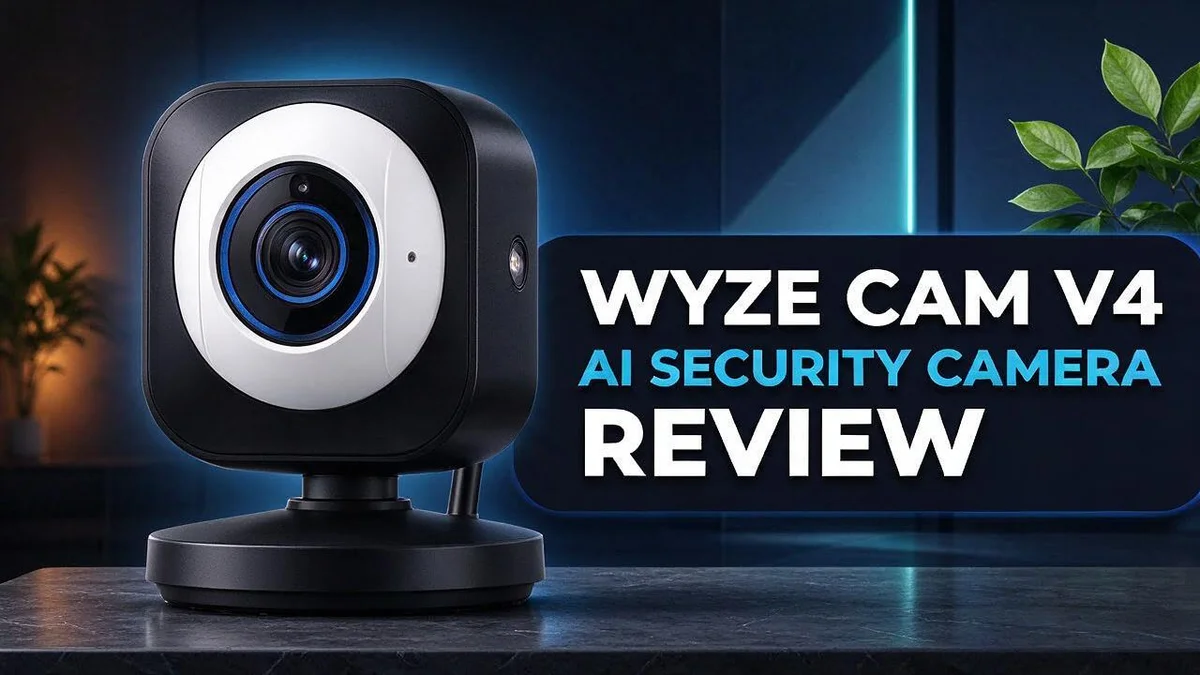
Looking for a home camera that sees clearly day and night? The Wyze Cam v4 could be the right choice. It is a wired camera that works both indoors and outdoors.
Sharp video is the main draw. The 2.5K QHD sensor packs about 78% more pixels than standard 1080p cameras. Colors stay bright in dark rooms thanks to Starlight Color Night Vision.
Smart detection works right on the camera. Person detection runs on the onboard chip, so your footage does not need to travel to the cloud first. Sound detection adds another layer of alerts.
Setup is quick. Recording to a microSD card needs no monthly subscription.
This review covers the strengths, the weak spots, and how the camera stacks up against Lorex, Ring, and Arlo. Read on to see if it fits your home.
In a Nutshell
-
Night vision stays clear. Starlight Color Night Vision keeps footage in color after dark. Many users praise how sharp the picture looks at night.
-
Sound alerts add extra coverage. AI sound detection can flag unusual noises around your home. You can act fast when something seems wrong.
-
Talk to visitors from the app. Enhanced audio lets you speak through the camera in real time. Clear voice quality makes quick conversations easy.
-
Cloud extras need a plan. AI alerts, unlimited cloud storage, and cloud backup require Cam Plus. Check these needs before you choose this camera.
-
Some features need a closer look. One user reports that the camera cannot be selected in Home Monitoring. An unverified post also mentions a 30-second skip issue during playback, so test this yourself.
-
Competitors offer different strengths. Lorex leads on image quality, Ring offers cloud storage options, and Arlo goes wireless. Wyze keeps its feature set simpler, which suits buyers who want the basics.
Video Quality and Night Vision

- 4K Ultra HD Clarity with 360° Pan and 180° Tilt Coverage - Experience crystal-clear monitoring day and night with...
- AI-Powered Motion Tracking for Pets & People - Next-gen CPU with integrated NPU enables faster processing and...

Last update on 2026-11-05 / Affiliate links / Images from Amazon Product Advertising API
Night footage matters as much as daytime footage. Many cameras turn gray and grainy after sunset. The Wyze Cam v4 aims to keep the picture useful when the lights go down.
Placement changes everything. Mount the camera so it faces the front door or driveway. Avoid pointing it straight at a window, because bright sunlight or a porch light can wash out the scene.
Glare is the hidden problem. Headlights and shiny floors can make the image look blurry. Tilt the lens slightly downward to reduce this effect. Test the view at noon and again at midnight before you pick a final spot.
Infrared and color modes work differently. When light drops, the camera switches how it captures the scene. A small porch light nearby can help the camera show more color after dark. Without any light, the picture relies more on infrared.
Small habits keep the view sharp. Wipe the lens every few weeks with a soft cloth. Dust and fingerprints can soften the image more than most people expect. Check the video quality settings in the app, too.
Night clips can look dim at first. Review a few recordings after dark and look for faces, license plates, and package labels. If details seem weak, move the camera closer to the area you want to watch.
Who gains the most? People with dim entryways, side gates, or long driveways often see the biggest improvement. Homeowners who need extreme detail in total darkness may want to compare other options first.
Overall, the night view works well for everyday home security. Most households will find the picture clear enough to recognize visitors and spot unusual activity. A few simple setup choices make the biggest difference.
AI Detection and Smart Alerts
Smart alerts can cut down on noise. Many older cameras send a ping for every passing shadow. Person detection helps you focus on real visitors instead.
Local processing also protects privacy. The Wyze Cam v4 analyzes footage on the device itself. Fewer clips need to leave your home for analysis, which gives many households extra peace of mind.
Alerts work best when you test them. During the first week, walk past the camera, wave at it, and time how fast your phone responds. This quick check shows how the system behaves in your space.
Pets and moving shadows can still trigger alerts. No detection tool is perfect. Adjust the sensitivity in the app until the notifications feel useful rather than distracting.
Allow notifications on your phone. Even the smartest alert does nothing if your phone blocks it. Check the app permissions on your device so warnings arrive right away.
Review the event timeline often. Each alert links to a clip, so you can see what triggered it in seconds. Over time, you learn which events matter most to your household.
People who leave home often gain the most from this feature. Shift workers who sleep during the day also benefit. They can check activity without waking up for every small sound or movement.
Families with several members benefit too. Everyone can receive the same warning, so nobody misses a late delivery or an unexpected visitor. Shared awareness makes the whole household feel more secure.
Basic motion alerts fire for wind, rain, and headlights. Person detection narrows that flood of messages. You still get warned about people, but you skip many false alarms.
Smart alerts make the Wyze Cam v4 feel like a helpful assistant. Spend a little time on setup and testing. Then the camera handles much of the watching for you.
Two-Way Audio and Sound Detection
Sound alerts need the right settings. Start by checking the sensitivity level in the app. A setting that is too high can flag a dishwasher or a passing truck.
Test the audio before you rely on it. Ask a friend to stand near the camera. Listen from the app and check for echo, delay, or muffled words.
Room shape changes how voices sound. Hard floors and bare walls make voices bounce. Soft rugs and curtains near the camera can help speech sound clearer.
Wind and rain can also reach the microphone. Mount the camera under a porch roof when you can. Less noise means clearer voices and fewer false alerts.
Privacy matters with audio. Recording sound can raise legal questions in some areas. Check local rules and let guests know the camera records audio.
Audio in both directions also helps with pets. A calm voice often settles a barking dog. Speak softly, since a loud tone can startle an animal.
Delivery drivers also benefit. Tell them where to leave packages in a clear, short sentence. Short directions save time for everyone.
Run a volume check with a friend. Ask them to walk away from the camera slowly. Adjust the speaker level until you hear them clearly without startling anyone nearby.
Good audio turns the camera into a helpful presence. You can check on a house sitter or a child coming home. Clear sound makes every conversation easier.
Keep an eye on the sound. Review audio clips after alerts to see what the microphone captured. This habit helps you spot patterns and adjust settings over time.
Small changes add up fast. Retest the audio after each change. You will notice the difference right away.
Good sound and clear video work together. Each feature makes the other more useful. Set both up once, and your home feels safer every day.
Top 3 Alternatives
Eufy Indoor Cam

- 𝟒𝐊 𝐔𝐥𝐭𝐫𝐚-𝐂𝐥𝐞𝐚𝐫, 𝟐𝟒/𝟕 𝐑𝐞𝐜𝐨𝐫𝐝𝐢𝐧𝐠 | Capture...
- 𝟑𝟔𝟎° 𝐏𝐚𝐧𝐨𝐫𝐚𝐦𝐢𝐜 𝐕𝐢𝐞𝐰 | Easily navigate your home’s view with new...
Last update on 2026-11-05 / Affiliate links / Images from Amazon Product Advertising API
The Eufy Indoor Cam gives you a clear view of your home. It turns side to side and tilts up and down, so you can watch every corner of a room. Local storage lets you save recordings on a microSD card instead of sending them to the cloud. Many people like this option because it keeps their videos close to home. It also works well for small apartments and busy family rooms.
Ring Indoor Cam

- Get the whole picture – Watch over your home day or night in 1080p HD video with Live View and Color Night...
- Video previews – Record a few extra seconds before every motion event with Advanced Pre-Roll to get a more...
Last update on 2026-11-05 / Affiliate links / Images from Amazon Product Advertising API
The Ring Indoor Cam works well for families who already use smart devices. It sets up quickly through a simple app. You can see who is at the door or check on your pets while you are at work. Motion alerts arrive on your phone right away, so you stay informed without constant checking. Many users enjoy how easy it feels to manage every alert in one place.
Google Nest Cam

- Meet the smarter, sharper wired Google Nest Cam Indoor; with 2K HDR video and Gemini, it knows what to look out for...
- With an Advanced subscription to Google Home Premium, know more about what’s happening with notifications like...
Last update on 2026-11-05 / Affiliate links / Images from Amazon Product Advertising API
The Google Nest Cam fits people who love smart home features. It can recognize familiar faces and send helpful alerts. It also pairs well with other smart home devices, so you can control your setup from one place. Clear night video makes it easy to see activity after dark. Many owners say it feels reliable for everyday use.
Installation and App Experience
Setting up the Wyze Cam v4 is a simple job for most people. Plan for about thirty minutes from unboxing to live view.
Start with the Wyze app. Download it to your phone, create an account, and tap the add device button. Then scan the code shown on the camera.
The app walks you through each step. It asks for your home internet name and password, then the camera connects. Keep your phone near the camera during this step.
Mounting comes next. Pick a height that covers the door or yard without reaching it easily. Use the included hardware for a firm hold.
Plan the power cable first. The camera needs a nearby outlet. Map the cable route before you drill, so the wire stays neat and safe from weather.
Add a microSD card early. Local recording depends on this card. Format it in the app settings so the camera stores clips without errors.
The home screen puts live view, playback, and settings in one place. Most buttons sit where you expect them. New users learn the layout within a few days.
Home Monitoring may not work. One Reddit user says the camera cannot be selected in Home Monitoring. Check this during setup if you rely on that service.
Playback deserves a quick test. A Facebook post mentions a 30 second skip problem when moving forward or back through clips. This report is unverified, so try it yourself. Walk past the camera and then review the clip to confirm the view.
Updates arrive through the app. Open the settings menu to see new firmware. Install updates when you do not need the camera right away. Check the update history too, so you know what changed.
Overall, the setup feels smooth for most owners. Clear steps and a friendly layout make the Wyze Cam v4 easy to start using on day one.
Storage and Subscription Value
Storage decides how much footage you keep. The Wyze Cam v4 saves clips to a microSD card, so your video stays on site. You can start recording without signing up for anything extra.
Think about how far back you need to look. A larger card holds more days of footage before older clips get overwritten. Pick a card size that matches how often you want to review events.
Cloud storage works differently. Cam Plus adds unlimited cloud storage, so your clips live off site. This helps if a thief takes the camera or the card, because your recordings still exist somewhere safe.
Cam Plus also includes AI alerts and cloud backup. These extras matter most for busy homes with several people coming and going. Many owners keep the microSD card for daily recording and use the paid plan for key moments.
Ask yourself three questions before you decide. How many cameras will you run? How long do you want to keep footage? Would you lose important clips if the camera disappeared?
Local storage has a clear upside. Your recordings stay under your control, and nothing leaves your home unless you share it. You can also review clips right away without waiting for a download.
Cloud storage has its own strengths. Your clips survive a break in, a fire, or a damaged card. Searching older events also feels easier when everything sits in one online library.
Check your storage status often. Open the app and look at how much space remains. A full card may stop new recording without warning, so a quick weekly check helps you avoid gaps.
Many people combine both options. They use the card for everyday footage and the cloud for events that matter most. This mix gives you peace of mind without needing a complicated setup.
Storage is not a one-time choice. Your needs can change as your household grows or your schedule shifts. Review your setup every few months and adjust it when life changes.
Pros and Cons
Pros
- Sharp images show faces and details clearly.
- Color night vision keeps the view bright after dark.
- Person detection runs on the camera itself, so video stays off the cloud.
- Reviewers say the video quality feels strong for this class of camera.
- Basic recording works without a monthly subscription.
Cons
- Some users report a 30 second skip issue during playback, though this is unconfirmed.
- Lorex offers better image quality for buyers who want the sharpest picture.
- Compared with rivals, Wyze has fewer advanced features.
- Arlo gives you a wireless option, while this camera needs a wired power connection.
Who Should Buy It
Wyze Cam v4 fits some households better than others. Here is a simple guide to help you decide.
Homeowners who want a wired outdoor camera should take a close look. This camera works indoors and outdoors. It needs a nearby outlet, so it suits fixed spots like porches, garages, and backyards.
Plan the mounting height before you drill. A spot high enough to stay out of easy reach works best for most yards.
People who want sharp night views will like this model. Starlight Color Night Vision keeps the picture bright after dark. Faces and details stay clear, and porch lights and dark driveways show good detail.
Buyers who want local recording will appreciate the setup. Footage saves to a microSD card. Basic recording works without extra plans, and storage stays under your control. You choose what to keep.
Beginners who dislike complicated tools will feel comfortable. The Wyze app guides you through each step. Even first time users rarely need help, and the home screen keeps live view, playback, and settings together.
Privacy focused users can benefit from edge AI. Person detection runs on the camera itself. Video stays off the cloud for this feature, which many people prefer. AI sound detection adds another layer, and it can flag unusual noises around the home when you are away.
Some buyers should look elsewhere. If you need wireless freedom, Arlo offers a better match. If you want the sharpest picture possible, Lorex usually wins. Users who depend on Home Monitoring should check compatibility first, because one Reddit user reports the camera cannot be selected there.
Cam Plus users should plan for extra features. AI alerts, unlimited cloud storage, and cloud backup need the paid Cam Plus plan. Skip it if you only need local footage.
The bottom line is simple. Choose this camera if you want a wired, clear, and easy setup for home security. Think about your needs first, then decide. Compare other options if wireless use or top image quality matters most.
Final Verdict
Our final verdict is simple. The Wyze Cam v4 is a strong choice for most people who want clear video and smart alerts from one camera. It handles the basics well and feels easy to live with each day.
Its AI features add real strength to daily life. Person detection works on the camera itself, which helps keep your video private. The built-in AI sound detection also adds another layer of awareness when you are away. Together, these tools make the camera feel smarter than its simple look suggests.
Still, no camera fits every home. Some features need Cam Plus, and a few owners report gaps in Home Monitoring. Weigh those compromises carefully before you commit.
Who should buy it? Choose this camera if you want a wired setup and sharp footage. Choose it if you like keeping recordings on your own microSD card. New buyers often find the app friendly, so they can start quickly. Renters who want a simple setup can also benefit.
Who should look elsewhere? Skip this model if you need a wireless camera that you can move around. Skip it if you want cloud alerts without adding any extra plan. Shoppers who want the very best picture may prefer to compare other brands first.
Test before you commit. Write down your top three needs before you begin. Then spend your first week checking playback, alerts, and sound detection. Confirm that the features you care about work well in your home. This short test helps you spot any issue early, so you can decide with confidence.
Our bottom line. The Wyze Cam v4 delivers solid performance and simple setup. It suits households that value local recording and quick controls. Think about the rooms and spaces you want to watch most. Match the camera to your daily needs, and you will likely feel pleased with your choice.
Frequently Asked Questions
Does the camera detect sounds too?
Yes. AI sound detection is included. It helps you notice certain noises, even when nothing moves in view.
Can I talk through the camera?
Yes. You can talk and listen in both directions from the app. This helps when you want to greet a delivery driver or warn a visitor. Clear audio makes these moments easier.
Does it work with Home Monitoring?
Not for every user. Some people report that the camera cannot be selected in Home Monitoring. Check this before you buy if that feature matters to your home setup.
Which extras need a paid plan?
AI alerts, unlimited cloud storage, and cloud backup require Cam Plus. Think about which extras you truly need. If you only want simple recording, you may not need the extra plan at all.

Hi, I’m Simmy — the founder and voice behind AI Gadgets Insight. I’m a tech enthusiast who loves exploring the latest AI gadgets, smart devices, and innovative tech products. I started this blog to help people make smarter tech choices with honest reviews, easy-to-follow comparisons, and practical buying guides.