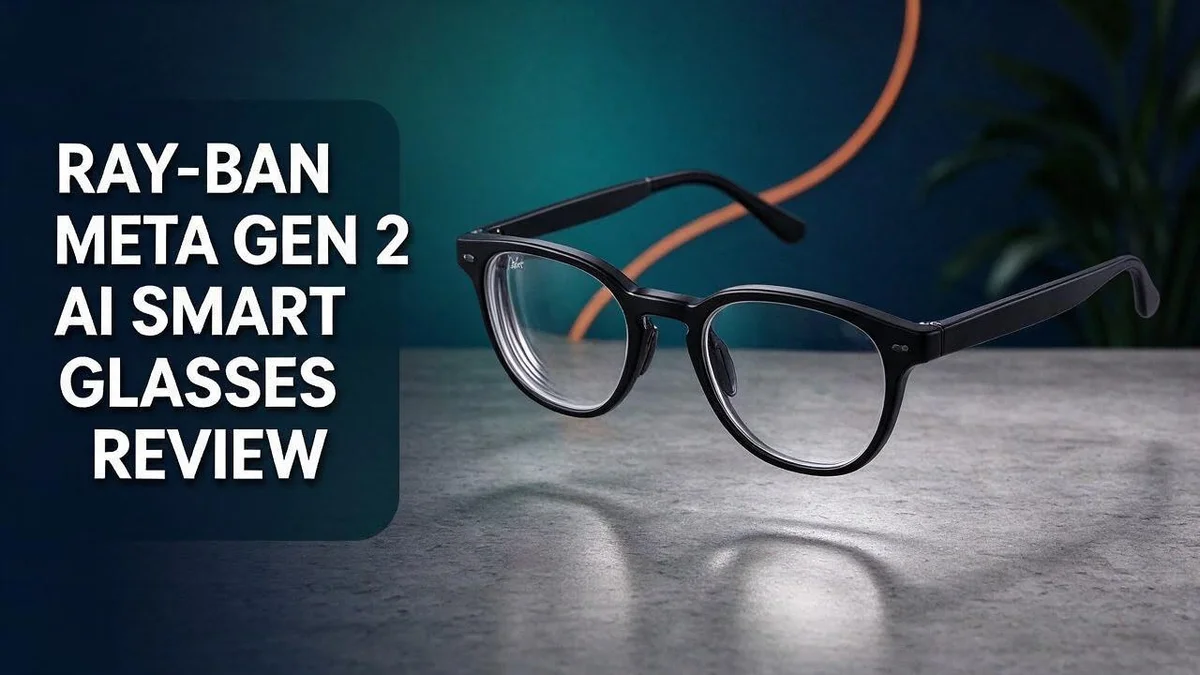
Ray-Ban Meta Gen 2 Review: Should You Buy This?
Are you looking for sunglasses that can also take photos, play music, and answer questions? The Ray-Ban Meta Gen 2 aims to do exactly that.
Many people want tech that does not look like tech. This pair keeps the classic Ray-Ban style while adding a 12MP ultra wide camera and a five microphone array.
Battery life is the biggest upgrade over the first generation. You also get thinner, lighter frames and 3K video capture. Clear audio and a helpful AI assistant make daily use simple.
In this review, we explore what works well, what could be better, and whether these glasses fit your routine. Keep reading for a clear, honest look at the Gen 2.
In a Nutshell
-
Lighter feel on the face: The Gen 2 frame sits thinner and lighter than its predecessor. You may forget you are wearing them after a while.
-
Sharp photos and video: A 12MP ultra wide camera captures sweeping scenes. Video reaches 3K, so clips look crisp on a bigger screen.
-
Clear audio for calls and music: A five microphone array picks up your voice well. The speakers also deliver music with a clean sound, although bass stays light.
-
Optional Neural Band: This accessory lets you control features with small hand gestures. It works well when your hands are busy or your phone is out of reach.
-
Bulkier look than classic frames: The Gen 2 model looks chunkier than traditional Ray-Ban sunglasses. Style fans may notice the extra bulk at first glance.
-
Watch for warmth and framing: The glasses can feel warm after heavy use. Lining up a shot also takes practice, since the view can be hard to frame.
Design and Wearability

- #1 SELLING AI GLASSES* – Tap into iconic style and advanced technology with Ray-Ban Meta, the #1 selling AI...
- META AI – Get more done and stay connected without reaching for your phone with AI glasses powered by Meta AI...

Last update on 2026-11-22 / Affiliate links / Images from Amazon Product Advertising API
Good design matters most when you forget you wear it. The Meta Gen 2 glasses aim for that feeling. Most people will judge them by how they sit on the face all day.
Fit depends on your face shape. Your nose bridge and temple width decide how the frame settles. Try them on before you commit, and check how the arms rest behind your ears.
Temple arms deserve extra attention. A firm grip keeps the glasses steady during a walk. A loose hold can cause small slips when you lean forward or look down.
Weight shows up later. A frame may feel fine for five minutes. After a few hours, pressure points can appear near the nose and ears. Plan short breaks if you wear them for long stretches.
Your daily activities also shape the experience. Sports, commutes, and office work place different demands on a frame. Think about where you plan to wear them most often.
Hats and helmets need a test. Brims can push the arms out of place. Cyclists and hikers should test the fit with their usual headwear before a long ride or trail day.
Lenses matter too. If you need prescription support, ask about lens options during setup. A clear view makes the design feel more natural in daily life.
Daylight and indoor looks differ. Tinted lenses look bold outdoors. Indoors, the frame draws more attention to the face. Consider which setting you use more often.
Cleaning keeps the design fresh. Fingerprints and dust build up on the lenses quickly. A soft microfiber cloth works well. Store the glasses in their case when you take them off.
Overall, the design rewards people who value comfort as much as style. Try them in person, wear them around the house, and see how they feel over time. Your own test tells you the most.
Camera and Video Capture
Capturing life as it happens is the main reason many people choose these glasses. You look at something interesting and record it in seconds.
The glasses shoot 3K video, which keeps small details sharp. Fine textures like tree bark and street signs stay clear.
Framing is the hardest part. You cannot see exactly what the lens sees, so aiming takes practice.
Try to keep your head level when you record. A small tilt can cut off the top of a scene or leave too much empty sky.
Hands free recording also helps during busy moments. You can film a hike, a cooking lesson, or a day at the park without holding anything.
Quick head turns can make footage look jumpy. Slow, steady movements usually produce smoother clips.
Lighting plays a big role in video quality. Bright daylight gives the cleanest colors, while dim rooms can look grainy.
Battery life matters here too. Longer recording sessions use more power, so plan shorter clips for busy days.
Before a big event, record a short test clip. This shows how the frame looks and helps you adjust your angle.
Privacy also deserves a thought. Let people know when you record, especially in shared spaces.
Once you finish, review each clip on your phone and delete the weak ones.
Who benefits most from this camera?
Casual creators who record daily life will enjoy the hands free style. Vloggers who need steady framing may find the glasses limiting.
Parents, travelers, and hobbyists often like the quick capture. You keep your hands free for the moment itself.
Practice makes the results better. A few weeks of short outings will teach you how the lens sees the world.
Overall, the camera offers easy, natural capture with room to grow.
Small habits make the biggest difference. Keep your head steady and check the light before you hit record.
Audio and Speaker Performance
Sound quality stands out quickly. The speakers in these glasses deliver clear music with good detail. Many listeners say the sound feels natural and easy to enjoy during a walk or commute.
Bass is the weak spot. Low notes feel light, so bass fans may want more punch. Hip hop and electronic tracks lose some of their thump, while vocals and guitars sound crisp.
The speakers sit near your ears rather than inside them. This open design lets you hear your surroundings. You can watch for traffic or chat with friends while your music plays.
Volume needs care in busy places. Traffic, trains, and crowds can cover the sound quickly. Many people turn the volume up too high in these settings, so start low and adjust slowly.
Nearby people may hear your audio. Open speakers leak some sound at higher levels. Keep the volume moderate on quiet trains, in offices, or during a library visit.
Hands free audio fits busy days. The speakers keep your hands free, so you can carry coffee or a bag. You can also listen to a podcast while you cook or clean.
The AI assistant speaks through the speakers. You can ask questions and hear answers without pulling out your phone. This feature feels handy when you travel or move around your home.
Fit changes the sound. A loose frame can shift the speakers away from your ears. Adjust the arms so the speakers face your ears and the sound feels fuller.
Overall, audio suits everyday listening. Podcasts, news, and music sound pleasant for most people. Listeners who want heavy bass should pair the glasses with headphones for deeper sound.
Test before you rely on them. Play a favorite song at home first. Listen for clarity, bass, and how loud the sound gets. A short test shows whether the audio meets your needs.
Top 3 Alternatives
Amazon Echo Frames

- Your favorite music and content – Play music, audiobooks, and podcasts from Amazon Music, Apple Music, Spotify...
- Alexa is happy to help – Ask Alexa for weather updates and to set hands-free timers, get answers to your...
Last update on 2026-11-22 / Affiliate links / Images from Amazon Product Advertising API
Amazon Echo Frames are a good pick if you want audio and voice help without a camera. They look like regular eyeglasses. Open-ear speakers play music, podcasts, and calls. You can ask Alexa for the weather, timers, or reminders. Simple controls make daily use easy. This option suits people who want a quiet, private style of smart glasses.
Oakley Meta HSTN

- DESIGNED TO GIVE YOU AN EDGE ON AND OFF THE FIELD — Wearable technology that allows you to capture photos and...
- UP TO 8 HOURS OF BATTERY LIFE — A fully charged pair of Oakley Meta HSTN glasses can last up to 8 hours of...
Last update on 2026-11-22 / Affiliate links / Images from Amazon Product Advertising API
The Oakley Meta HSTN brings a sporty look and a built-in camera. You can capture photos and short videos without using your hands. Meta AI answers questions as you move through your day. These frames suit runners, cyclists, and outdoor fans. They work well for active days because they stay light and secure.
Xreal One

- Giant Virtual Screen – Immersive Theater Anywhere: Step into a breathtaking virtual screen up to 500 inches...
- Premium Display Quality – Smooth, Sharp, and True-to-Life: XREAL 1S delivers ultra‑smooth viewing with a 120Hz...
Last update on 2026-11-22 / Affiliate links / Images from Amazon Product Advertising API
Xreal One works differently from the other two options. It acts as a display for a large virtual screen. You connect it to a phone, laptop, or gaming device. Watch movies or work on a big screen wherever you go. It has no camera and no built-in voice assistant. This choice fits people who want a private viewing experience.
AI Assistant and Hands-Free Control
Talking to your glasses feels natural. A short, clear request often gets the best result. Most people find their rhythm after a few tries.
The five microphone array does much of the listening work. It helps the glasses pick up your voice in a busy cafe or on a windy street. Speaking at a normal volume usually works well.
Voice commands also cover quick tasks. You can start a photo, begin a video, or ask for the time. Each request keeps your attention on the moment instead of a screen.
The optional Neural Band adds a silent way to control the glasses. It picks up subtle hand gestures, so you can respond without saying a word. This option suits quiet offices, libraries, and people who simply prefer silence.
Setup takes a few minutes. Keep the band charged so your gestures respond every time. Practice a few gestures at home before you head out.
Some people feel odd speaking to their glasses in public at first. Most people nearby soon forget about it. Your confidence grows with each outing.
Background noise can still confuse the system. Wait for a clear pause before you speak. A short break helps the assistant understand you.
Start with simple questions. Build up to longer requests once you learn what the assistant handles well. Short, direct phrases often save time on the go.
Hands free control changes daily routines. You can snap a photo while holding a leash or a shopping bag. Your phone can stay in your pocket for many small moments. Users who juggle work and errands often find this feature saves real time.
In short, the assistant and controls make the glasses feel like a natural extension of your day. Your hands stay free, and your eyes stay on the world around you.
Battery Life and Heat Under Heavy Use
Battery life is the biggest upgrade over the older model. Many owners notice this change first. With normal use, the battery lasts a good part of the day.
Heavy use changes the picture. Music, voice questions, and photos all draw power at the same time. The battery drops faster when you stack these tasks together.
Heat is the other side of heavy use. The glasses can feel warm after long sessions. This happens because the internal parts work hard. It is normal, but it still deserves attention.
Warm frames can feel odd near your temples. Take a short break when the heat builds. Set the glasses down for a few minutes.
Spread your tasks across the day. Avoid running music, AI questions, and photo taking for hours without rest. Small pauses protect both the battery and your comfort.
Keep the glasses away from hot cars and direct sun. Outside heat adds to the warmth from inside. Store them in the case when you finish using them. The case helps the frames cool down and keeps them safe.
Charge the glasses before you leave home. Top up during lunch or a coffee stop. A quick boost gives you more time when you need it most.
The fit also matters during long wear. The frames feel light on the face. Still, they can feel snug after several hours. Remove them now and then to let your nose and ears relax.
Check the frames with your fingers. If they feel hot, stop using them. Let them rest before you start again.
Simple habits keep these glasses working well. A steady routine gives you strong battery life and fewer heat issues. You can enjoy the features all day without worry.
Pros and Cons
Pros
– Sharp 3K video captures smooth clips for everyday moments.
– Thinner and lighter frames feel less bulky on your face.
– The stylish design fits well with casual and work outfits.
– The 12MP camera takes detailed photos in good light.
Cons
– The frames look chunkier than classic sunglasses styles.
– Framing a shot takes practice before photos look right.
– Comfort feels fine, but the fit is not especially cozy.
Who Should Buy It
The Ray-Ban Meta Gen 2 suits people with busy, active lives. It fits best with those who want a camera and a helper close at hand.
Commuters often find them very handy. Your hands stay free on crowded trains or busy sidewalks. You can check directions or send a message without digging out your phone.
Parents may enjoy the everyday moments. A quick clip of a school play takes only seconds. You keep your eyes on the moment instead of a screen.
Travelers who like to explore should take a look. Ask about a landmark or a menu item. The answer comes through the speakers, so you keep walking and looking around.
Casual creators can find plenty of fun here. Vloggers who film quick clips for friends can enjoy the simple setup. Still, plan some practice time before you rely on them for important shoots.
Fans of bold eyewear may like the look. The frame shape makes a statement. Pick a pair that matches your style and your comfort needs.
Students and remote workers can also benefit. Quick voice questions help with simple research while you move between tasks. Use them for reminders, notes, or fast facts during a busy study session.
Anyone who values convenience will likely be happy. Speaking to your glasses feels natural after a short adjustment period. Give yourself a few days to learn the best way to phrase your requests.
Shoppers who want a practical tech gadget may enjoy them most. They blend into everyday life better than many gadgets. Still, make sure the features match what you truly need.
Who should skip these glasses? Listeners who crave deep bass may want a different option. People who want slim, classic sunglasses may prefer a traditional pair.
Ask yourself a few honest questions first. How often will you wear them? Do you want hands free help during daily tasks? Your answers show whether these glasses fit your routine.
Final Verdict
Our final take is simple. These glasses make a strong case for people who want a camera and a voice helper that stays out of the way.
The overall experience feels polished from day one. Clear sound and a helpful assistant give the glasses a real everyday benefit.
Still, they suit some lifestyles better than others. Think about how you plan to use them before you decide.
Ask yourself three simple questions. Do you want quick clips without pulling out your phone? Do you enjoy talking to an assistant while you walk? Will you wear them for short outings or long days?
If you answered yes to most of these, you will likely enjoy the upgrade. Your answers help you choose wisely.
The optional Neural Band adds another layer for people who prefer quiet control. It works best for those who want discreet commands instead of touch.
Honest trade offs matter too. The frames still look bulkier than classic eyewear, and some wearers notice warmth after long sessions. These points may not suit everyone.
Our verdict is positive but measured. The Gen 2 model improves on its predecessor in many useful ways. It earns a spot on your list if you want a smart camera that feels like a natural part of your day.
Smart glasses keep improving each year. This model shows how far the category has come, and it sets a clear standard for future designs.
Before you buy, visit a store and ask the team to show you the controls. Practice a few voice commands before you leave. A short hands on session tells you more than any spec sheet.
Pick the glasses that fit your routine, not someone else’s. A camera you always carry beats a fancy one left at home.
Frequently Asked Questions
Do the speakers sound good for music?
Yes, many listeners praise the speakers for music. The audio is clear, but bass is limited. Bass lovers may want to pair them with headphones for deeper sound.
What is the Neural Band?
The Neural Band is an optional accessory. It gives you hands free control over the glasses. Many people like it for quiet control in public places.
How can I keep the glasses from getting warm?
Short sessions keep the frames cooler. Heavy use, such as long recording, can warm them up. Take breaks between longer videos to stay comfortable.
Are these glasses a good choice for first time smart glasses buyers?
They can be a great starting point. The AI assistant is easy to use, and the design looks like regular eyewear. Try them on in person first, since comfort and fit vary from person to person.

Hi, I’m Simmy — the founder and voice behind AI Gadgets Insight. I’m a tech enthusiast who loves exploring the latest AI gadgets, smart devices, and innovative tech products. I started this blog to help people make smarter tech choices with honest reviews, easy-to-follow comparisons, and practical buying guides.