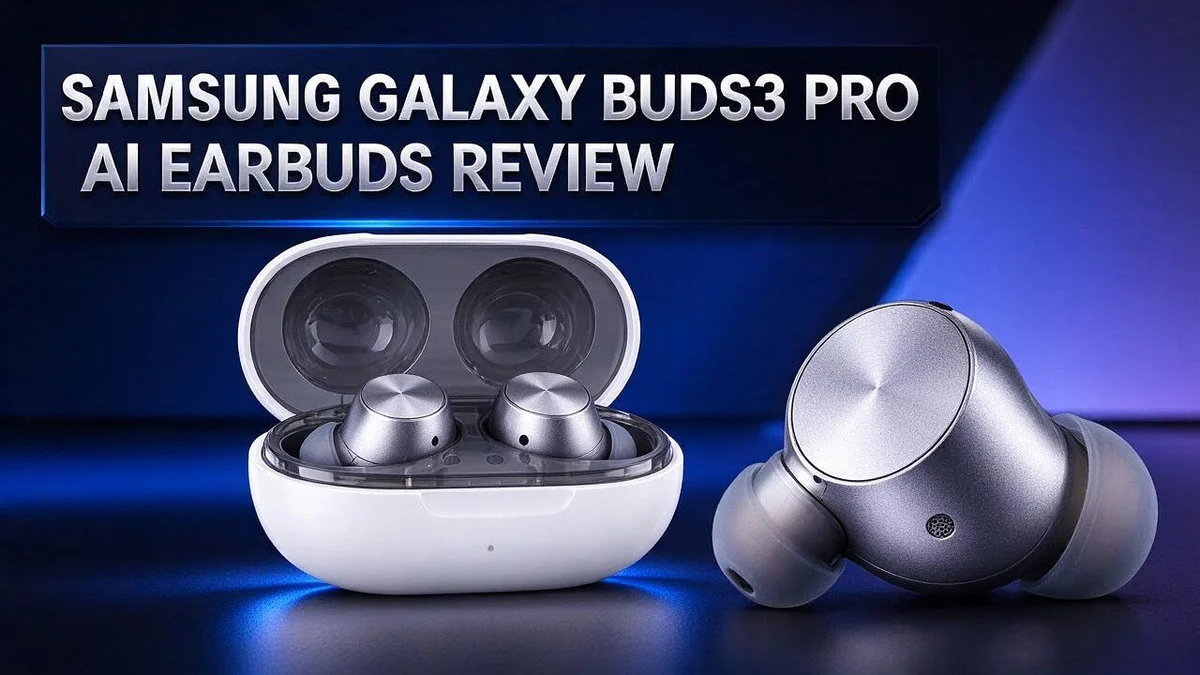
Samsung Galaxy Buds3 Pro Review: Is It Worth The Hype?
Do you want earbuds that sound great and fit well all day? Samsung’s Galaxy Buds3 Pro brings Galaxy AI right into your ears.
Active noise cancellation blocks out busy streets and noisy offices. The adaptive EQ adjusts the sound to suit your listening style.
The standout feature is Interpreter mode. It translates live conversations straight through your earbuds.
Comfort matters too. The redesigned fit feels light and secure. Many listeners praise the rich sound and clear detail.
Still, some buyers spot a few issues. Ear tips can tear when removed. Early owners also found the AI features less groundbreaking than expected. Let’s look at everything you need to know.
In a Nutshell
- Sound lovers get rich detail. The dual driver setup delivers clear highs and full bass. Music fans can hear subtle layers in every track, from vocals to soft background notes.
- Adaptive EQ adjusts on the fly. Galaxy AI tunes the sound to your surroundings. You get a balanced listen without digging through settings or fiddling with an equalizer app.
- Voice commands keep playback simple. You can pause, skip, or switch tracks using your voice. Built-in volume controls also let you turn the sound up or down without reaching for your phone.
- Bluetooth reaches up to 10 meters. You can walk around your home, move between rooms, or step away from your desk while your music keeps playing.
- Ear tips need careful handling. Many owners report tears when they remove the tips. Pull them off gently and check the tips often to avoid replacing them early.
- Rivals may suit different needs. The Huawei FreeBuds Pro 5 is a strong option for Android users. The JLab JBuds Mini fits small pockets, the Beats Studio Buds+ focuses on comfort, and the Bose QuietComfort Earbuds lead on pure quiet listening.
Sound Quality and Noise Cancellation

- Compatibility & Battery Life: The Samsung Galaxy Buds 3 Pro are compatible with Android devices running Android...
- Audio Features: Equipped with Bluetooth 5.4, the Buds 3 Pro support SSC HiFi and UHQ audio codecs, delivering...
Last update on 2026-11-04 / Affiliate links / Images from Amazon Product Advertising API
Sound quality starts with a good seal. The Galaxy Buds3 Pro uses noise isolating eartips that block outside sound. A snug fit also helps the bass feel full and steady.
Try a song with soft vocals and heavy drums. The voice should sit clearly in front. The drums should stay punchy without covering the singer.
The two way driver setup keeps highs and lows separate. This means the mix rarely feels muddy, even at higher volumes.
Noise cancellation works best against steady sounds. Train engines, fans, and air conditioning hum fade away. Sudden noises, like a loud coworker or a slamming door, may still break through.
Test the difference yourself. Play the same track with noise cancellation on, then switch it off. You should notice how much background noise drops away. The music also gains more space.
Podcasts and audiobooks benefit too. Speech stays clear while chatter in the room fades into the background.
Keep your volume moderate. Strong noise cancellation lets you hear music at lower levels. This habit protects your ears during long listening sessions.
Check your tips often. A torn eartip breaks the seal. When that happens, both noise cancellation and bass suffer. A quick inspection after each removal takes only seconds and keeps your sound steady over time.
Listeners who mainly want quiet commutes may also compare the Bose QuietComfort Earbuds. For most people, though, the Galaxy Buds3 Pro delivers rich detail and calm listening in busy places.
Comfort and Fit
Comfort decides whether you keep earbuds in all day. The Galaxy Buds3 Pro features a redesigned fit. Still, every ear shape is different.
Ear canals vary in size and shape. One pair can feel snug on one person and loose on another.
Start by sitting or standing still. Push each bud in gently and turn it slightly. Then shake your head and check if it stays put.
A good fit stays stable during walks, workouts, and quick head turns. Try a short jog or a few brisk steps around the room.
Pressure matters too. Earbuds that press hard can cause soreness after a few hours. Take short breaks to let your ears rest.
Glasses, hats, and headphone bands can change how the buds sit. Wearing these items may shift the seal. Adjust the buds again if you notice any slipping.
Glasses wearers may want to try different angles. Some people find that turning the bud slightly helps it sit flat against the ear. Small changes can make a big difference.
Also, make sure your ears are clean before you insert the buds. Wax or dirt can stop the tips from sealing well. A quick wipe keeps the fit firm.
Long listening sessions need comfort too. A snug but gentle fit helps during long commutes, flights, or video calls.
Check the fit each day. Look for changes in sound, since a loose seal often makes bass sound weaker. If the bass fades, reseat the buds.
Good fit gives you better comfort and better sound. Spend a few minutes finding your setting. Your ears will thank you later.
Galaxy AI and Interpreter Mode
Galaxy AI gives the Buds3 Pro more than music controls. Its Interpreter mode helps you follow live translations during everyday talks.
This feature can help at a café, a shop, or a hotel desk. You speak in your language, and the other person hears the translation. It can make short exchanges feel easier.
Take turns when you talk. Speak in short phrases so the translation keeps pace. Pause after each reply. This gives the earbuds time to finish, so the other person can follow along.
Practice before you travel. Try the feature at home with a friend who speaks another language. You learn the rhythm and find your comfort level.
Interpreter mode works best with a clear voice and a quiet room. Background chatter can confuse the translation, so step aside from busy areas.
Set your language pair before you leave home. Open the settings early, so you avoid fumbling with your phone during a conversation.
Eye contact matters too. Look at the other person while you speak, not at your screen. Your phone can handle the rest.
Some early owners felt the AI features did not feel groundbreaking. Keep your expectations realistic. Treat interpreter mode as a helpful tool, not a perfect replacement for a professional interpreter.
Privacy matters too. Review the app permissions and data settings on your phone. Choose options that match how you feel about sharing voice data.
Software updates can add features over time. Check for updates once a month. Keep your earbuds and phone updated, so new language options and fixes reach you.
Top 3 Alternatives
Sony WF-1000XM5

- Bundle Includes: Sony WF-1000XM5 True Wireless Noise-Canceling In-Ear Headphones (Black), Goby Labs Headphone...
- Powered by advanced integrated processors and dual feedback microphones, the WF-1000XM5 delivers highly effective...
Last update on 2026-11-04 / Affiliate links / Images from Amazon Product Advertising API
The Sony WF-1000XM5 is a strong choice for active noise cancelling. Its compact design fits most ears well. Sound stays rich and clear, so you can enjoy music on daily commutes or long listening sessions.
Apple AirPods Pro 2

- PIONEERING HEARING — AirPods Pro 2 unlock the world’s first all-in-one hearing health experience: a...
- INTELLIGENT NOISE CONTROL — Active Noise Cancellation removes up to 2x more background noise.* Transparency mode...
Last update on 2026-11-04 / Affiliate links / Images from Amazon Product Advertising API
The Apple AirPods Pro 2 suit people who already use Apple devices. They switch between iPhone, iPad, and Mac with ease. Adaptive Transparency lets you hear your surroundings without removing the earbuds.
Bose QuietComfort Earbuds

- ADAPTIVE NOISE CANCELLING FOR EVERYDAY FOCUS: Quiet Mode reduces distractions during commuting, desk work, or...
- PERSONALIZED SOUND WITH BOSE IMMERSIVE AUDIO: CustomTune measures how your ears shape sound and adjusts audio...
Last update on 2026-11-04 / Affiliate links / Images from Amazon Product Advertising API
The Bose QuietComfort Earbuds focus on comfort. They sit snugly and stay secure during workouts. Bose delivers excellent noise reduction for focused, quiet listening in busy places.
Connectivity and Controls
Connecting your Galaxy Buds3 Pro is quick. Open Bluetooth on your phone and select the buds from the list. Once paired, they link to your device without extra steps.
Stay close to your phone for the best link. The Bluetooth range reaches about 10 m in open space. Walls, crowds, and bags can weaken the signal, so keep your phone nearby.
Controls live right on the buds. You can tap the stem to play, pause, or skip tracks. Check the Galaxy Wearable app to set which tap does what.
Voice commands add another layer. You can ask for playback help without touching your phone. Practice a few phrases so they feel natural.
This feature helps when your hands are full, such as during a run or while carrying groceries.
Volume controls sit right on the buds. Raise or lower sound with a quick touch. Use your phone for big changes, and use the buds for small tweaks during a walk.
Calls work through the same controls. Tap to answer or end a call, and keep your hands free while you talk.
If sound cuts out, move back closer to your phone. Check that Bluetooth stays on. Restarting Bluetooth often fixes the issue.
Test your controls before you head out. Try each tap, voice prompt, and volume change while seated at home. Practice in a quiet spot so you feel confident outdoors.
Learn the layout once and the buds feel natural. Most people adjust within a day or two. Your muscle memory grows fast with regular use.
Durability and Ear Tip Quality
Tearing is the main durability concern. Many owners say the ear tips rip when they pull the buds out. This happens most often at the thin seam near the base.
Pull the bud straight out. Do not yank it at an angle. Hold the stem firmly and let the bud slide free. This habit can protect the tip from strain every day.
Check the tips often. Look for small cracks, thin spots, or loose edges. A damaged tip can lose its seal, so sound may get weaker and noise cancellation may drop.
Dust and earwax can make the material dry out. Wipe the tips with a soft dry cloth after use. Avoid harsh cleaners, soaking, and sharp tools. Let them dry fully before you put them back in the case.
Store the buds in the case. The case keeps the tips safe from pockets, keys, and coins. Keep the case away from heat, such as a hot car dashboard. Heat can soften the material over time.
Good tip care helps the buds last longer. Keep spare tip sizes if your kit includes them. Replace a torn tip right away so the seal stays strong.
Ear tips wear down with time. Expect some change after many months of daily use. Replacing them on schedule is a simple way to keep the buds working well.
Clean tips help the seal last. Check the opening on each tip for wax buildup. Gently brush it dry with a soft tool.
Make a simple check before a trip. Look at both tips, then test the seal with a short listen. If one side sounds thin, replace that tip first.
Battery and Charging Case
The battery shapes how you use the Galaxy Buds3 Pro every day. Short sessions are easy. Long trips need more planning.
Noise cancellation uses extra power. Turn it off when you want longer listening time. You can switch modes in the Galaxy Wearable app.
The charging case works as a backup. Drop the buds back inside after each use. The case refills them while you wait.
Check the battery level often. Open the app or look at your phone’s Bluetooth panel. A quick glance helps you plan a charge before a flight or workout.
Charge the case when it sits idle overnight. A full case gives you extra power on the go. Keep the lid closed to protect the buds.
Charging contacts need care too. Wipe them with a dry cloth. Dirt can slow down charging and cause odd connection problems.
Heat and cold can affect the battery. Avoid leaving the case in a hot car. Store it at room temperature for steady performance.
Wireless charging adds convenience. Place the closed case on a compatible charging pad. Check that your pad supports the case before you buy one.
Plan your charging routine. Top up the buds during lunch or a short break. This habit keeps your listening going all week.
Pick a spot for the case. A desk drawer or a bag pocket works well. Keep it away from water and sharp objects.
Battery health fades over time. Expect less playtime after long use. Contact Samsung support if the battery drains fast right away.
Pros and Cons
Pros
– Superb sound quality with rich detail
– Strong noise cancellation that blocks busy street sounds
– Comfortable fit for long listening sessions
– Interpreter mode offers live translation right in the earbuds
– Adaptive EQ adjusts the sound as you listen
Cons
– Early owners felt the AI features were not groundbreaking
– Fit can feel different from one ear shape to another
– Rivals like the Bose QuietComfort Earbuds may suit some listeners better
Who Should Buy It
Samsung Galaxy Buds3 Pro fits people who already use a Samsung phone. Pairing feels smooth, and the features work well together.
Commuters are another strong match. The noise cancellation blocks train rumble and busy street sounds, so podcasts and calls stay clear.
Music lovers who care about detail should take a close look. The sound feels clear and full across most genres, from pop to jazz. Fans of rich vocals will hear plenty of nuance.
Travelers may also find these buds handy. Language features can help during a quick chat abroad, and the case stays small enough for a bag.
Remote workers who spend long days in meetings may appreciate the focus that noise control brings. Blocking background chatter helps keep attention on the screen.
Runners and gym users need a secure fit. Try the buds during a real workout before deciding. Pick a pair that stays put during jumps and quick turns.
People who mainly want great audio can ignore the AI extras. The core sound and comfort still deliver a solid daily experience.
Buyers with small or unusual ear shapes should test the fit first. Ask a store to let you try a few tip sizes if possible.
Shoppers who want a compact option may compare the JLab JBuds Mini. Those who want a pair focused on comfort may look at Beats Studio Buds+ instead.
In short, these earbuds suit Samsung users, commuters, and music fans. They work best for people who want strong sound and steady noise control.
Final Verdict
So, should you buy them? For most people, the answer is yes. The Samsung Galaxy Buds3 Pro deliver a strong overall listening experience.
Think of them as a dependable daily companion, not a gadget that changes your life. Some early owners expected the AI features to feel more groundbreaking. Set clear expectations, and you will likely feel happy with your choice.
Think about where you will wear them most. A busy office, a crowded train, or a quiet home desk each asks something different from your earbuds. Match the buds to your routine.
People who want strong audio, quiet focus, and easy controls will get the most from these buds. They also suit anyone who likes a simple setup with fewer steps.
Fans of other brands may want to compare a few options first. The Huawei FreeBuds Pro 5 and Beats Studio Buds+ each suit different listening habits. Read both sets of reviews, then decide which features matter most to you.
Finally, weigh the benefits against the downsides. Strong sound and good noise control stand out. The tip issue and mixed AI reviews are the main drawbacks. Most shoppers will find the balance fair.
Our final take is simple. These earbuds deliver top sound and a comfortable fit. Their AI extras are a bonus, not the main reason to buy. Test the fit, check the tips, and you will know fast if they belong in your daily routine.
Frequently Asked Questions
Do the ear tips tear when I remove them?
Some owners report this problem, and it is the most common complaint. Pull the buds out slowly and avoid tugging hard on the stem. Check the tips often for small tears so you can replace them early.
How far can I move away from my phone?
The Bluetooth range is about 10 meters. Keep your phone in a pocket or bag, and the buds stay connected. Thick walls and crowded spaces can cut that distance down.
Can I control music without touching my phone?
Yes. You can use voice commands to play, pause, or skip tracks. The earbuds also have built-in volume controls, so you can adjust the sound quickly while you move around.
What do the two drivers do for sound?
Each earbud uses two drivers. One handles the higher tones, and the other handles the lower tones. This split keeps the sound clear, which helps layered songs and busy tracks stand out.

Hi, I’m Simmy — the founder and voice behind AI Gadgets Insight. I’m a tech enthusiast who loves exploring the latest AI gadgets, smart devices, and innovative tech products. I started this blog to help people make smarter tech choices with honest reviews, easy-to-follow comparisons, and practical buying guides.