
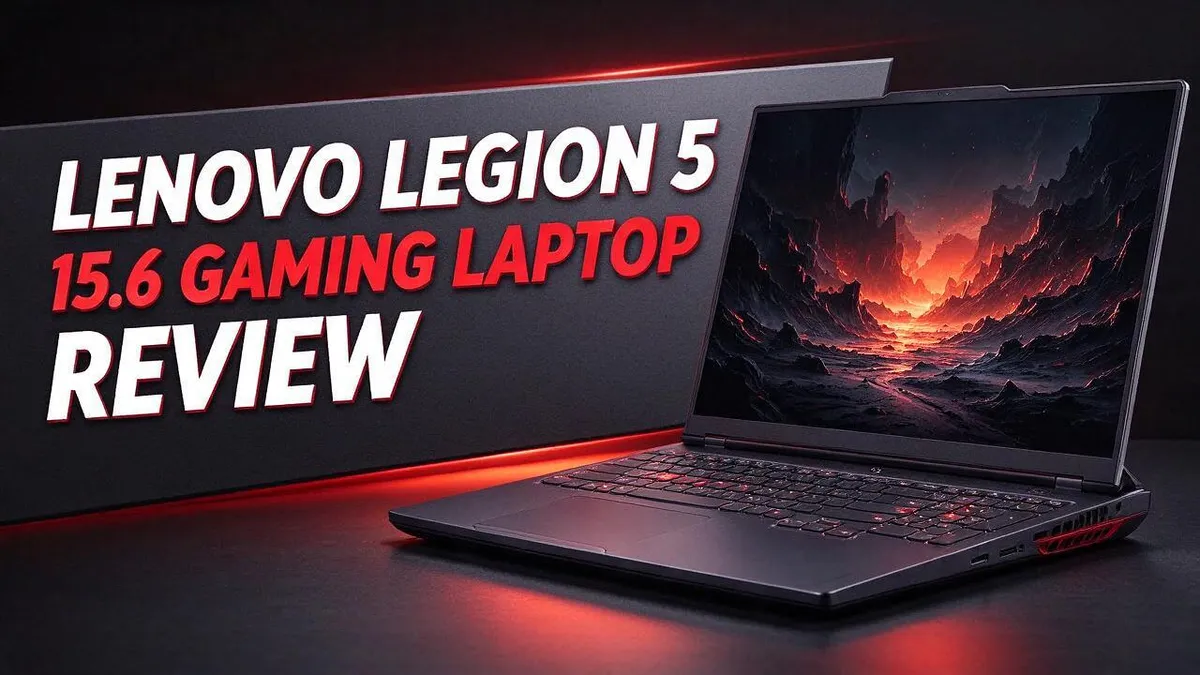
Lenovo Legion 5 15.6 Gaming Laptop Review: Should You Buy This?
Are you searching for a gaming laptop that can keep up with your favorite titles? The Lenovo Legion 5 15.6 gaming laptop could be the perfect match. It mixes serious performance with a clean, mature look.
Gamers will appreciate the power inside. Newer models pair an Intel Core Ultra processor with an NVIDIA RTX 5060 graphics card. That combination handles demanding games with ease.
Long gaming sessions can heat up any machine. This laptop uses a strong cooling system to keep temperatures in check. Its 144Hz 1080p display delivers smooth motion for fast-paced action.
Typing feels good here too. The customizable RGB keyboard offers comfortable white backlighting. Your setup gets a stylish glow.
In this guide, you will see what this laptop does well. We will also share a few details to consider. Let us see if it deserves a spot on your desk.
In a Nutshell
- Strong gaming power: The Legion 5 handles demanding games well. The RTX 5060 option on the 15 inch Gen 11 model gives players a serious boost.
- Reliable cooling: A strong cooling system helps the laptop stay steady during play. This matters most when sessions run for hours.
- Fun RGB lighting: The customizable RGB keyboard lets you pick colors that match your style. The white backlighting option looks clean and easy on the eyes.
- Clean, mature look: The sleek design fits well in many settings. It avoids flashy styling while still feeling modern.
- Smooth 144Hz display: The 1080p screen on the reviewed model refreshes 144 times each second. Motion looks fluid, which helps in fast-paced titles.
- Check the exact model: Specs change between versions. The 15IMH05 uses a GTX 1650 Ti and has a USB-C processor limitation, so compare configurations before you buy.
Gaming Performance and GPU Options

Last update on 2026-11-24 / Affiliate links / Images from Amazon Product Advertising API
The graphics card does most of the heavy lifting in games. Choosing the right GPU matters more than almost any other part.
The newer Legion 5i Gen 11 comes with an NVIDIA RTX 5060 Laptop GPU. It packs 8GB of GDDR7 video memory, which helps textures load cleanly in modern titles.
Video memory works like a workspace for your graphics. When that workspace is larger, the card handles high detail settings with less strain. This matters most in open world games and demanding shooters.
Some versions use the Legion 5 15IMH05 with a GTX 1650 Ti. It offers 4GB of GDDR6 memory.
This setup suits lighter games and popular esports titles. Newer releases may need lower settings to keep frame rates steady.
Processor power matters too. The Core Ultra 9 and Core Ultra 7 chips handle multitasking well. Streaming while you play becomes much easier.
The Core i5 model works well for everyday gaming. Expect to adjust settings in heavier games.
The 16 inch variant offers a 240Hz display. That extra speed shows fast motion more clearly.
Competitive players often value this smoothness in fast shooters.
Memory also shapes your frame rates. The newer model ships with 16GB of DDR5 5600 memory.
Fast memory feeds data to the processor and GPU quickly. Check the spec sheet before buying if you want more memory later.
Keep USB C limits in mind. The 15IMH05 has a USB C processor limitation. Read the details first if you plan to rely on USB C features.
Match the GPU to the games you play most. Light titles run well on the GTX 1650 Ti. Demanding games look best on the RTX 5060.
Clear goals lead to a smart choice. Decide your target frame rate and resolution first. Then pick the model that fits.
Display Quality and Refresh Rate
The screen shapes how every game feels. A sharp panel shows fine details, bright colors, and smooth motion. This part of the review looks at what to check before you choose.
Refresh rate is the number of times the screen updates each second. Higher numbers usually mean smoother motion. However, a high number only helps when your graphics card can produce enough frames to match it.
Balance the screen with the graphics card. If the GPU outputs 60 frames per second, a faster panel cannot add smoothness on its own. Think of the screen and the card as a team.
Adaptive sync helps keep motion clean. It matches the screen timing to the frame rate, which reduces tearing and stutter. Check the listing or manual to confirm this feature on your model.
Panel type also affects color and viewing angles. Some panels keep colors accurate when you sit off to the side. Look for panel details on the spec sheet so you know what you get.
Response time describes how quickly each pixel changes color. Faster pixels reduce blur during fast scenes, such as racing or action sequences. Compare this number across models for a clearer picture.
Brightness matters in rooms with windows or bright lamps. A matte finish reduces glare, so the image stays easy to read during the day. Glossy screens can look vivid indoors but reflect more light.
Eye comfort counts during long sessions. Set a comfortable brightness level and take short breaks every hour. Soft lighting behind the screen also reduces strain.
Battery life drops when the screen runs at high refresh rates. Lowering the rate while you browse or watch videos saves power. You can raise it again when you start a match.
Your favorite games should guide your choice. Fast shooters and racing titles benefit most from smooth motion. Slower adventure games still look great at moderate settings, so a high rate is not always necessary.
Cooling System and Thermal Behavior
Heat is the hidden challenge in every gaming laptop. When the processor and graphics card work hard, they release a lot of warmth. The cooling design decides how fast that warmth leaves the chassis.
Thermal throttling happens when a laptop slows its parts to protect them from overheating. You may notice frame rates drop after a long session. This drop does not always mean a fault. It often means the system is protecting itself.
Airflow starts at the vents. Cool air enters through the intake areas, and warm air exits through the back and sides. Blocked vents force the fans to work harder. Keep the laptop on a hard, flat surface so air can move freely.
Soft surfaces like beds, couches, and blankets block the intake. Many players use their laps for comfort, but that habit raises temperatures quickly. A desk or a laptop stand gives the fans room to breathe.
Room temperature matters too. A warm room makes cooling harder for any machine. Air conditioning helps the fans pull in cooler air during long matches.
Fan modes change the balance between noise and temperature. Quiet modes keep the fans slow and the room calm. Performance modes spin the fans faster and keep the chips cooler. Choose the mode that fits the game and your space.
You can check the results yourself. Open a monitoring app and watch the numbers during a match. Stable readings show good airflow. Sudden spikes often point to blocked vents or a buildup of dust.
Warmth above the keyboard is normal during long sessions. The heat pipes move energy away from the core, so some surface heat is expected. Extreme heat in one spot, however, deserves a closer look.
Dust is the slow enemy of cooling. Lint and pet hair collect inside the vents over time. Clean the vents every few months with compressed air. Clean airflow keeps performance steady for years.
Simple habits protect the hardware. Use the laptop on a firm surface. Keep the vents clear. Watch the temperatures during a test session. These small steps protect your gear and your gaming time.
Top 3 Alternatives
ASUS ROG Strix G16

- HIGH-LEVEL PERFORMANCE – Unleash power with Windows 11 Home, an Intel Core i7 Processor 14650HX, and an NVIDIA...
- FAST MEMORY AND STORAGE – Multitask seamlessly with 16GB of DDR5-5600MHz memory and store all your game library...

Last update on 2026-11-24 / Affiliate links / Images from Amazon Product Advertising API
The ASUS ROG Strix G16 is a strong pick for serious gamers. It often comes with a fast processor and a powerful graphics card. Its high refresh rate display makes fast games feel smooth and clear.
The chassis feels solid and looks sleek. Cooling is a highlight, since the vents keep heat under control during long sessions. Battery life is short, so plan to stay near an outlet when you play.
Acer Nitro V 15

- 16GB DDR4 | 512GB SSD
- Equipped With The Most Powerful and Fast 13th Gen Intel 8-core i5-13420H
Last update on 2026-11-24 / Affiliate links / Images from Amazon Product Advertising API
The Acer Nitro V 15 offers a friendly balance of performance and comfort. It handles modern titles well at 1080p. Many players like its simple design and easy to read keyboard layout.
Upgrade options are a nice bonus for future needs. Its screen is bright enough for most rooms. Color accuracy is not the best in its class, though. Players who want room to grow will appreciate the extra memory slots.
HP Victus 15

- 『 Immersive Visual Experience 』15.6" FHD IPS 1920 x 1080 144Hz Pixels 250 nits brightness → 45% NTSC...
- 『 Power-Packed Performance 』Intel i5-13420H → 8 cores (4 P+ 4E) 12threads → Up to 4.6 GHz with Turbo Boost...
Last update on 2026-11-24 / Affiliate links / Images from Amazon Product Advertising API
The HP Victus 15 keeps things simple and useful. It packs capable hardware into a clean, understated body. Students and casual gamers often choose it for daily tasks and game nights alike.
Thermals stay manageable during most play sessions. The keyboard feels comfortable during long typing sessions too. Overall, it suits anyone who wants a dependable machine without extra fuss.
Build, Design and Keyboard Experience
The Legion 5 looks sleek and mature. It avoids flashy shapes that shout for attention. This style fits well in offices, dorms, and living rooms. Many owners say it looks clean on a desk.
The chassis feels solid when you open the lid. A firm base helps the screen stay steady during fast action. Less wobble makes every session feel more controlled.
Weight matters if you carry the laptop often. Gaming machines can feel heavy in a backpack. Plan for the charger too, since it adds extra bulk.
The keyboard uses a backlit design with customizable RGB lighting. You can pick colors that match your room or your mood. Lighting also helps during late night sessions.
The white backlighting deserves special mention. It feels soft in dim rooms. Players can find keys quickly without harsh glare.
Key layout is important for quick commands. Gamers often press WASD and nearby keys again and again. A layout that stays in place keeps hands steady. Good spacing reduces mistakes during intense moments.
Typing feels natural for school and work too. Most people adjust to the keys within a few days. Your fingers will learn the spacing with practice.
Use a mouse for shooters and strategy games. The touchpad works well for browsing, emails, and streaming. Many people switch between both without trouble.
Check port placement before you connect accessories. Rear ports keep cables away from your mouse area. Side ports work better for quick plug ins.
Clean the keys with a soft cloth each week. Crumbs and oil build up fast during snacks and long sessions. A gentle wipe keeps the keyboard looking fresh.
Overall, the build suits players who want a clean look. The keyboard feels comfortable for long sessions and daily tasks. Buyers who want a clean setup will appreciate it. It makes a strong all round choice for many users.
Ports, Connectivity and Upgrade Options
Ports matter more than many buyers expect. A gaming setup needs a mouse, headset, and monitor. Good access keeps the desk clean.
The Legion 5 15IMH05 has a USB Type C limitation tied to its processor. Check that detail before you plan external devices.
Memory upgrades offer a simple path. The Legion 5i Gen 11 ships with 16GB of DDR5 memory. This SODIMM format usually allows future expansion.
Confirm the slot count and maximum supported size first. Good planning avoids wasted effort.
Storage space fills up quickly. Modern games can take huge amounts of space. Many models include an M.2 slot for an extra drive.
Check the listing for your exact model. Layouts vary between versions.
Wireless connections deserve attention too. A strong wireless standard helps online play feel stable. Wired links reduce interference from nearby devices.
If your model includes an Ethernet port, use it for ranked matches. It gives the steadiest link.
External displays need the right outputs. Gaming on a larger screen requires a clear video path. Look for HDMI or DisplayPort outputs on the side or rear panels.
Use the graphics card outputs for the best image quality. Avoid adapters when possible.
A docking station adds extra room. It connects several devices through one cable. Check that the dock supports your video outputs.
Cable management keeps the setup safe. Loose cables can pull on the ports. Use clips or a cable tray near the desk.
A powered hub helps when several devices draw power. It keeps the laptop ports free for essentials.
Some upgrades affect warranty coverage. Opening the bottom panel may void parts of the warranty. Read the policy before you start any work.
Keep the original screws and parts in a safe place.
Simple checks lead to smart choices. Make a short list of the devices you use daily. Compare that list with the specs of your chosen model.
Pros and Cons
Pros
- Strong gaming performance comes from the RTX 5060 graphics chip.
- The 144Hz screen makes fast action look smooth.
- Higher models offer a 240Hz display for quicker response.
- The cooling system keeps the chips steady during long matches.
- Several sizes and configurations fit different players.
Cons
- Older configurations use the GTX 1650 Ti with only 4GB of memory.
- The standard display runs at 1080p, which may look less sharp on large screens.
- Specs change between models, so buyers must check each listing.
- Demanding games can make the fans louder under heavy load.
Who Should Buy It
Some people will enjoy this laptop more than others. Think about how you play, where you sit, and what you need from a machine.
Students who game after class often want one device for everything. This model can handle homework, video calls, and late night matches with ease.
Streamers and content creators can also find a good fit here. The processor should handle background tasks while a game runs, which helps when you record clips or share live sessions.
Desk setup owners can get the most from it. Connect a larger monitor and the laptop becomes a strong main computer. It still moves from room to room when you need it.
Players upgrading from older machines will notice the change fast. Older laptops often struggle with newer releases, so this model offers a clear step up in daily gaming.
Casual players who mostly enjoy lighter titles may not need every extra feature. A simpler machine could serve them well and keep life easier.
Parents shopping for teens should set expectations early. Talk about screen time, shared rules, and where the laptop lives at night. A clear family plan keeps the device useful and fun.
People who plan to keep a laptop for four or five years should think ahead. Ask whether your favorite games will grow heavier over time. Consider whether extra memory or storage will matter later, even if your needs feel small today.
Before you decide, ask yourself a few simple questions. Where will you play most often? Which games sit at the top of your list? How long do you plan to keep the machine?
Your answers matter more than any spec sheet. A clear picture of your habits leads to a smart choice you will enjoy for years.
Final Verdict
Our final take is simple. The Lenovo Legion 5 15.6 is a capable gaming laptop that fits many players well.
Pick it when smooth play matters most. Modern titles run with steady frame rates. The clean design also looks right at school, at work, or in a shared living room.
Raw power matters, but it is only one piece of the puzzle. Schoolwork, photo editing, and light video projects all place different demands on hardware.
Look at the whole package. Keyboard comfort, screen feel, and day to day handling all shape your experience after a long session. The white backlit keyboard can make late night sessions easier on the eyes. Many people will appreciate that small detail.
Run a quick checklist before you buy. A few simple steps prevent surprises and help you pick the right version.
First, confirm the exact model number on the listing. Second, compare the graphics chip with the games you play most. Third, read the warranty and return policy. A clear return window gives you room to test the laptop in your own setup.
Match the laptop to your habits. Strong results come from honest expectations, not from chasing the biggest headline numbers.
The Legion 5 suits people who want reliable gaming power without a complicated setup. It rewards players who game often and expect consistent results.
Our verdict: the Legion 5 15.6 delivers strong gaming performance, a practical cooling design, and a clean look that blends into most rooms.
Choose it when you know your games, your routine, and the features you cannot live without. Then you can buy with confidence and enjoy many hours of play.
Frequently Asked Questions
Does the Legion 5 look good outside a gaming room?
Yes, the design looks sleek and mature. It fits well in a home office, a dorm room, or a classroom. Few people will guess it is a gaming machine at first glance.
Can I upgrade the memory later?
The listed model uses 16GB of DDR5-5600 SODIMM memory. SODIMM modules are usually simple to swap, so adding more later is often possible. Check the manual for the slot count before you buy any new sticks.
Is the keyboard comfortable for long sessions?
The keyboard feels comfortable, especially with white backlighting. You can also customize the RGB lighting to match your setup. Long gaming sessions feel less tiring when the keys sit well under your fingers.
Will 8GB of graphics memory handle new games?
The RTX 5060 Laptop GPU comes with 8GB of GDDR7 memory. This suits most modern titles at solid settings. Very demanding games may need lower settings to keep frame rates high. Check your favorite games first to be sure.
Does the 15IMH05 model have any limits I should know?
Yes, the Legion 5 15IMH05 has a USB-C processor limitation. Check that your planned accessories and setup work with this model. This quick check saves time and avoids frustration after delivery.

Hi, I’m Simmy — the founder and voice behind AI Gadgets Insight. I’m a tech enthusiast who loves exploring the latest AI gadgets, smart devices, and innovative tech products. I started this blog to help people make smarter tech choices with honest reviews, easy-to-follow comparisons, and practical buying guides.