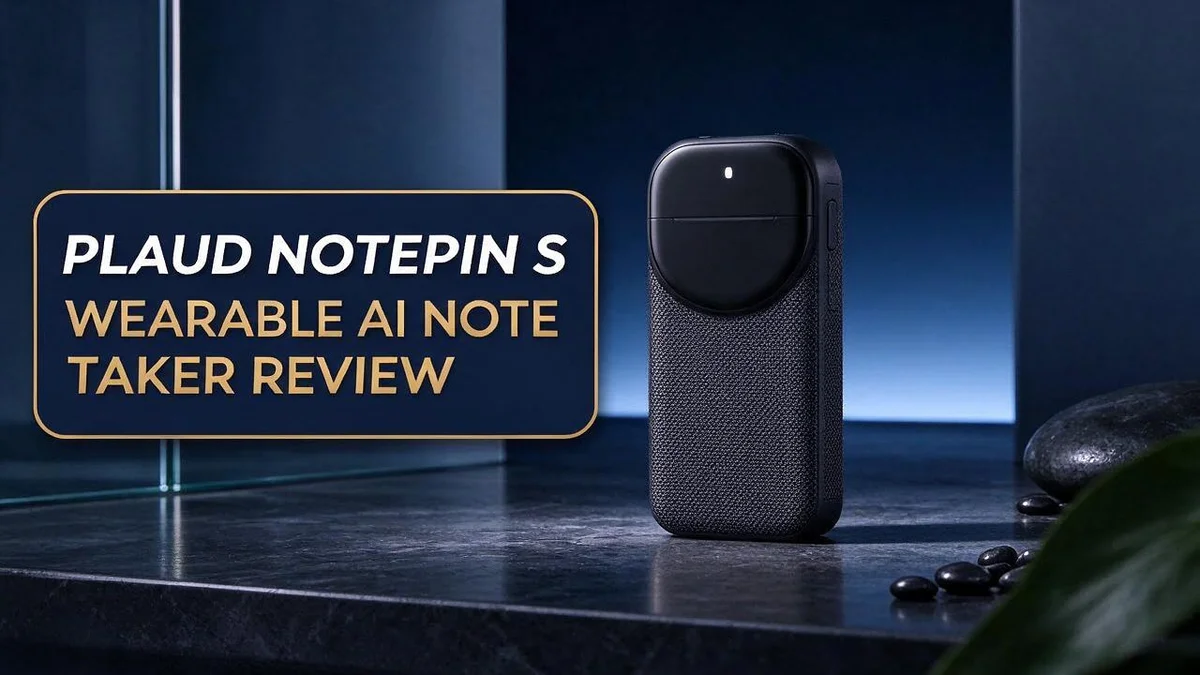
Plaud NotePin S Review: Is This Wearable AI Note Taker Worth It?
Do you miss key ideas after long meetings? You are not alone. Many people struggle to take notes while they talk. The Plaud NotePin S helps solve that problem.
This small device clips to your clothing or wears on your wrist or neck. You press the physical button and feel a clear click. Then it records your face to face conversations.
Fast AI transcriptions and summaries arrive after each talk. Your hands stay free for real conversation. Wirecutter notes that this freedom is one of its biggest strengths.
Is it the right fit for you? This guide breaks down the design, features, strengths, and limits. You will also see how it compares with other popular note takers. Keep reading to decide if this wearable belongs in your daily routine.
In a Nutshell
-
A real button you can feel: Every recording starts with a press you can feel. That firm click gives clear proof that the device is capturing your words. You never need to guess.
-
More room for long days: The NotePin S holds 18% more than the prior model. You can record full meetings, lectures, and client visits without stopping to clear space. Long days stay covered.
-
Best for live conversations: This device works well for talks held in person. It does not detect phone calls, so remote calls need another tool. Plan your setup with that limit in mind.
-
Battery and app limits to watch: Reviewers point out that battery life and app features could hold you back. Test these areas during your first week. Then you know if the balance works for you.
-
Rivals worth comparing: Plaud Note Pro, the Sony AI recorder, Otter, Granola, Pocket, and Flowtica Scribe all compete in this space. Each one fits a different workflow. Compare them side by side before you decide.
-
Who should consider it: Busy professionals, students, and field workers who talk a lot in person may benefit most. Hands free capture lets you focus on the conversation.
Design and Wearing Options

- Capture on-the-go and online conversations: Long-press to record and short-press to highlight. Capture voices...
- Made to wear all day: Wear the 0.61 oz (17.4 g) NotePin S as a clip, pin, necklace, or wristband, with up to...
Last update on 2026-11-05 / Affiliate links / Images from Amazon Product Advertising API
The NotePin S uses a pill shape that stands out from bulkier recorders. This simple form helps it blend into daily life.
Where you wear it matters more than many people expect. The right spot keeps the device steady and easy to reach.
A clip suits people who want a quick and simple setup. It stays close to the conversation without extra gear.
Wrist wear fits people who like to keep the device in view. It works well during walks between meetings or site visits.
Neck wear feels different from the other options. It sits near the chest, which can feel natural at a desk.
Try each option before an important talk. Notice which one feels calm and stays put.
Movement tests matter more than a quick glance. Walk around, lean forward, and sit back to check stability.
Switching positions takes only a moment. You can move the device from a shirt to a wrist as your day changes.
Think about your daily routine first. People who sit most of the day may prefer a clip or neck option. Field workers who move often may lean toward wrist wear.
Comfort over long days deserves attention too. A comfortable device is easier to keep on during a busy week.
Look at the device from a social angle as well. Some people prefer a discreet look during client meetings. A small pill shape usually draws less attention than a large gadget.
Clothing matters too. Loose shirts or thick jackets can hide the device or pull it out of place. Thin fabric may not hold a clip firmly, so test your favorite outfits.
Keep spare placement ideas in mind. If one spot fails, switch to another. Your routine may change with projects or travel.
Overall, the design gives you flexible choices. Each wearing option supports a different style of day. Choose the spot that fits your habits best, because a steady placement helps you focus on the people in front of you.
Button Control and Recording Experience
The NotePin S keeps controls simple. One physical button handles most of the work. You do not need to open an app first.
Quick taps help you act fast. Start or stop a session with minimal effort. This matters most when a conversation moves quickly.
Speed matters in live talks. You may not have time to open an app. A single press lets you focus on the person in front of you.
Many users worry about missing the start. Pressing the button before a talk gives peace of mind. Check your recording status before the first words are spoken.
Think of the button as your safety net. It keeps your notes running even when your attention drifts. Practice the button a few times before you rely on it.
Recording feels calm once you start. The device does the listening while you stay engaged. You can nod, ask questions, and make eye contact.
Pause and resume should feel natural. Stepping away for a quick break is simple. Review the saved file later to confirm what was captured.
Battery and app limits can affect button use. Reviewers note these gaps in their tests. Plan a charge before big events so the button always responds.
Ask yourself how often you will press it. Frequent meetings call for frequent checks. Keep the button easy to reach in your daily setup.
Your routine decides the experience. The button works best when you use it the same way each time. Consistency builds trust in your notes.
Shared settings matter too. Tell your team that you record before the talk starts. Clear consent keeps everyone comfortable and builds trust.
Small habits add up over time. A quick press before each talk saves stress later. Your notes will feel complete and easy to trust.
Transcription and Summary Quality
Transcripts are only as useful as they are accurate. The NotePin S delivers fast AI transcriptions and summaries, which saves time after a busy day. Speed alone does not tell the full story, though.
Start by reading a short transcript from your first recording. Look closely at names, dates, and numbers, since AI tools often miss these details. Fixing them early builds trust in the results.
Summaries deserve the same careful look. A good summary pulls out main points, decisions, and next steps. It should never add ideas that nobody shared in the room.
Background noise can change the results. A busy café or a crowded hallway may leave gaps in the text. Try a test recording in the places where you usually talk.
Accents, fast speakers, and specialist terms also matter. Industry words may look strange at first. Keep a short list of common terms to check each time you review your notes.
Overlapping voices can cause trouble. When two people speak at once, the transcript may blur who said what. Pay close attention to these moments, because they often hold the most important points.
Try this simple test for your own routine. Record a five minute chat with a friend. Read the transcript side by side with what you actually said, then review the summary for key points.
Quality grows with practice. Each review shows you where the tool shines and where it needs help. Over time, you will know when to trust the summary and when to double check.
Think about who reads your notes. Teammates may expect clean wording and clear action items. Editing a few lines before sharing keeps everyone on the same page.
Good notes make later work faster. You spend less time searching for details. You also spend less time asking others what was said in the meeting.
Top 3 Alternatives
Limitless Pendant
- Capture on-the-go and online conversations: Long-press to record and short-press to highlight. Capture voices...
- Made to wear all day: Wear the 0.61 oz (17.4 g) NotePin S as a clip, pin, necklace, or wristband, with up to...
Last update on 2026-11-05 / Affiliate links / Images from Amazon Product Advertising API
The Limitless Pendant is a small clip-on device that records your conversations. It turns speech into searchable text. You can find key details later without replaying hours of audio.
Many people like its focus on privacy and its clear transcripts. It works well for meetings, interviews, and classes.
Sandbar Stream Ring

- 【BOAT MODEL COMPATIBILITY】Compatible with Field & Stream Blade 120. Please review your boat type, size and...
- 【BUILT-IN SLIDE HAMMER】Integrated slide-hammer construction helps drive the spike into suitable sand or soft...
Last update on 2026-11-05 / Affiliate links / Images from Amazon Product Advertising API
The Sandbar Stream Ring fits on your finger and records voice notes with a single tap. You can capture ideas while you walk, drive, or cook.
It keeps your hands free and your thoughts safe. A companion app sorts each recording by date and topic.
Bee Wearable

- Meet Bee Frontier - Your wearable personal AI that automatically transforms your conversations into clear...
- Conversation summaries that catch the details – Bee automatically summarizes your conversations, extracting key...

Last update on 2026-11-05 / Affiliate links / Images from Amazon Product Advertising API
The Bee Wearable is a lightweight wristband that listens to your day. It creates summaries and action items from your conversations.
This helps busy people track tasks without typing. The band feels light, so you can wear it for hours.
Subscription and Storage Value
Plaud NotePin S includes an annual Unlimited plan with the device. Many people want to know what that plan means for daily use. This section explains how storage and subscription work together.
Storage sets your daily limit. The NotePin S holds 18% more capacity than the prior model. The research does not state the baseline, so the exact difference stays unclear. Even so, extra room helps during busy weeks.
Start with a simple count. Think about how many conversations you record in a typical week. Add up the total hours of talk you capture. This quick count shows whether the space fits your routine.
Unlimited sounds generous, but read the terms first. Check whether any limits apply to transcripts or summaries. Look for rules about how long files stay in your account. Some users find that storage is never their main concern.
Storage also depends on your clearing habits. Move key recordings into your own notes folder each week. Delete short test clips you no longer need. This small habit keeps the device ready for new meetings.
Ask yourself a few key questions. Will you keep recordings for several months? Do you share files with a team? Do you need access on more than one device? Clear answers help you judge the fit.
Sharing also affects storage use. Shared folders can fill up quickly when several people upload files. Set clear rules for who saves what. This keeps the account tidy for everyone.
Plan your use for the next twelve months. Estimate busy seasons, such as project launches or exam periods. Extra recording days in those weeks may need more space. Plan ahead so the device does not fill at a bad time.
The annual plan also brings a yearly check point. Mark the renewal date on your calendar. Review your usage a few weeks before it renews. This habit prevents surprises and helps you plan ahead.
Finally, pick the habit that fits you best. Some people sync files each evening. Others prefer a weekly review. Choose one routine and stick with it for a month.
Privacy and Recording Limits
Privacy matters more than many people expect. A device that listens can make others feel uneasy. Tell people before you record them.
The NotePin S captures conversations in person. It does not detect phone calls, so calls stay outside its reach. Do not rely on it for phone calls.
Recording laws vary by place. Some regions require everyone in a conversation to agree before audio is captured. Check the rules where you live and work.
Ask for consent at the start of meetings. A simple line like “I use an AI note taker, is that okay?” sets a clear tone. Most people respect honesty and appreciate the openness.
Workplaces often have their own policies. Some companies limit personal recording devices in certain rooms. Read your employer guidelines before you bring the device to work.
Think about where your notes go. Transcripts may contain names, health details, or private plans. Treat every file as sensitive information.
Review the privacy settings in the companion app before your first use. Look for options about who can access your data. Adjust them to match your comfort level.
Old audio files can become a risk if an account gets hacked. Delete recordings you no longer need. This simple step limits what someone could see.
Be careful with shared devices. If someone else borrows the NotePin S, they may reach your recordings. Protect your account with a strong password.
Privacy also means knowing when not to record. Medical appointments, legal talks, and emotional moments may deserve your full attention. Sometimes the best choice is to leave the device off.
Keep the device visible when you record. Hidden recording can feel like a betrayal, even when you mean well. An open approach keeps conversations honest.
Good privacy habits build trust. People feel safer when you handle their words with care. Use the NotePin S with kindness, and it becomes a helpful partner instead of a source of tension.
Pros and Cons
Pros
- It frees your hands so you can focus on the conversation.
- Fast AI transcriptions appear soon after each recording.
- AI summaries turn long talks into short, useful notes.
- The physical button gives a clear click when you press it.
- It attaches to your wrist, neck, or clothing.
Cons
- Battery life may not last through a long day.
- App features feel limited for some users.
- It works best for in person talks only.
- It does not pick up phone calls.
Who Should Buy It
Some people will benefit more than others. The best match is someone who spends many hours in face to face conversations. Think about your daily routine before you decide.
Students make a strong group of possible buyers. Lectures, study groups, and office hours move fast, and writing everything down is hard. A wearable device lets them stay present and keep the main ideas. Good notes help them review before exams.
Journalists and researchers also gain from this style of recording. Interviews often run long, and a single missed quote can cause trouble later. A device worn on the body keeps the interview flowing without a laptop on the table.
Busy managers and team leads are another good fit. Their days often include one on one check ins, client visits, and quick hallway talks. Having a note taker ready at all times means fewer missed action items.
Freelancers and small business owners can save time too. Many of them handle sales calls, site visits, and consultations alone, often with no staff to help. A simple device helps them capture details without hiring an assistant.
Some users should look elsewhere. If most of your work happens on video calls or phone calls, another tool may serve you better. Desktop recorders or meeting apps can capture online audio directly.
People who prefer typing their own notes may not need this device either. Writing by hand or on a laptop helps some people remember details. That habit still works well for many learners.
Those who want deep app features should also compare options first. Some buyers expect advanced editing tools or team dashboards. A careful look at your must have features will save you from disappointment later.
The right choice depends on your daily life. Ask yourself where you spend most of your talking time. Your answer will show whether this wearable note taker belongs in your routine.
Final Verdict
The Plaud NotePin S suits people who spend their days in conversation. It fits best when most talks happen in person. Its clear button and small shape make it simple to start.
Before you decide, look at your own week. Count how many hours you sit across from someone. If that number is high, this device can earn its place in your routine.
Set your expectations early. It will not replace every tool you own. It works as one helpful part of a wider setup.
Compare it with other options, too. The Plaud Note Pro, a Sony recorder, and apps like Otter each serve different needs. Some teams prefer a meeting app that joins video calls. Others want a pen that turns handwriting into text.
Run a one week test before you commit. Wear it during normal days and note where it helps. Watch for moments when it slows you down.
Your daily routine decides the answer. A device like this works best when it blends into your habits. If it adds friction, another tool may serve you better.
Create a simple folder system for your recordings. One folder for each client or project keeps everything easy to find. Good organization saves time later.
Review your notes within a day. Fresh memory helps you spot errors in the transcript. You can also add context while the conversation still feels clear.
A note tool can matter more as your work grows. Think about where your career or business will be in a year. Choose the tool that supports that path.
In short, the NotePin S earns a spot for face to face workers. It is a focused tool with clear strengths. Choose it when your conversations drive your work, and skip it when they do not.
Frequently Asked Questions
Do I need permission to record a conversation?
Always ask first. Recording laws differ by country and state. Clear consent builds trust and avoids awkward moments with the people you meet.
Can the NotePin S replace handwritten notes?
Not fully. Many people still jot down names, dates, or quick ideas by hand. Let the device capture the full conversation, and use a pen for key reminders.
Will it work well in noisy places?
Test it in the places you visit most. Busy offices, cafes, and trade events add background sound. Record a short sample first, then listen back to check how clear the voices sound.
Which other Plaud devices should I compare it with?
The Plaud Note Pro is a close relative worth a look. Other options include the Sony AI recorder and Otter. Compare the features that matter most to your daily work before you choose.

Hi, I’m Simmy — the founder and voice behind AI Gadgets Insight. I’m a tech enthusiast who loves exploring the latest AI gadgets, smart devices, and innovative tech products. I started this blog to help people make smarter tech choices with honest reviews, easy-to-follow comparisons, and practical buying guides.